
Ratoc Systems U2SCXU User manual

USB2.0-UltraSCSI
Converter
U2SCXU
User’s Guide
March 2003
Rev.1.0

U2SCXU
1.Introduction .................................................. 1
1-1.PackageConfirmation ........................................................... 1
1-2.System Requirements and Restrictions ................................ 2
2.Installation .................................................... 4
2-1.ConnectingtheU2SCXU to a SCSI device ............................ 4
2-2.Connectingthe U2SCXU to a PC ........................................... 6
2-3.Installing on Windows XP...................................................... 7
2-3-1.InstallingaRATOCoriginaldriveronWindowsXP ...... 8
2-3-2.Installinga Microsoft driver on Windows XP ............... 11
2-4.InstallingonWindows Me..................................................... 12
2-4-1.Installinga RATOCoriginaldriver on WindowsMe .... 13
2-4-2.Installinga MicrosoftdriveronWindowsMe ............... 16
2-4-3.UsingMO drives on Windows Me .................................. 17
2-5.InstallingonWindows 2000 ................................................. 18
2-5-1.Installing a RATOCoriginal driver on Windows2000. 19
2-5-2.Installing a MicrosoftdriveronWindows2000 ........... 24
2-6.InstallingonWindows98SE ................................................. 25
2-7.Removingthe U2SCXUfroma PC ........................................ 30
2-8.ConnectingtheU2SCXUto aMac ........................................ 32

3.Utility ........................................................... 33
3-1.UsingutilityonWindows ...................................................... 34
3-1-1.U2SCXUTY.EXEUtility .................................................. 34
A.Config Utility .................................................................... 36
B.FirmwareupdateUtility ................................................... 39
3-1-2.DiskformattingandPartitioningUtility ........................ 41
A.FormatUtilityonWindowsMe/98SE .............................. 42
B.Disk Utility on Windows XP/2000 ................................... 45
3-2.Using utility on Mac .............................................................. 47
3-2-1.Installingutilityon MacOS 9.x....................................... 48
A.Config Utility.................................................................... 51
B.FirmwareupdateUtility .................................................. 54
3-2-2.Using utility on MacOS X ............................................... 57
A.Config Utility.................................................................... 59
B.FirmwareupdateUtility .................................................. 60
4.Troubleshooting ......................................... 61
4-1.GeneralHardwareTroubleshooting...................................... 61
4-2.DeletingtheRATOCoriginaldriver(WindowsXP/2000) ... 62
4-3.Deleting theRATOCoriginaldriver(WindowsMe/98SE) ... 63
4-4.Updating theRATOCoriginaldriver(WindowsXP) ............ 64
4-5.UpdatingtheRATOCoriginaldriver(WindowsMe) ............ 68
4-6.UpdatingtheRATOCoriginal driver(Windows2000) ......... 72
4-7.UpdatingtheRATOCoriginaldriver(Windows98SE) ......... 77
4-9.Whenanewdrive letter isn’tassigned(Windows)................ 83
4-10.When thepowerLEDdoesn’tcomeon(Win/Mac) .............. 84

4-11.Amessagesaying[Scanningfailed] appears when you
removedtheU2SCXUremovableicon(RATOCU2SCX-USB2
SCSIConverter)(Win/Mac) ................................................ 85
4-12.A message saying [The device “RATOCUSBMassStorage
DeviceWDM(withMPD)cannotbestoppedbecauseaprogram
isstill running”]appearswhenyou try toremovetheCBU2U
removableicon(RATOCCBUSB EnhancedHostController)
(Win/Mac)........................................................................... 85
4-13.Wizardstartsupwith a scannerconnected(Windows)
......
86
5.RegistrationandTech-Support .....................................88
6.Options ................................................................89
7.Specifications .........................................................90
Appendix ................................................................91


1
1.Introduction
This User’s Guide describes how to install, use, and troubleshoot the USB2.0
-Ultra SCSI Converter U2SCXU(called U2SCXU in this User’s Guide).
The information in the README file on the CD-ROM may include the latest
information. Be sure to read the file as well.
1-1.PackageConfirmation
Check Package Contents:
•U2SCXU USB2.0-Ultra SCSI Converter
•U2SCXU CD-ROM
•User’s Guide
•Software Licence Agreement
NOTE
If any of these items are missing from the U2SCXU retail package,
contact your supplier immediately.

2
1-2.SystemRequirementsandRestrictions
PC
•USB2.0 enabled PC running Windows XP/2000/Me/98SE
If your PC doesn’t have the USB2.0 interface, the U2SCXU works
as USB1.1 device.
Mac
•USB enabled Apple PowerMac G4/G3, PowerBook G4/G3,
iMac/iBook running Mac OS 9.2.1 or later/Mac OS X -10.1 or later.
The U2SCXU works as USB1.1. With Mac OS, the U2SCXU doesn’t
work as USB2.0 device.
SCSI devices
•High-Density 50 pin female SCSI-2 connector on a SCSI device
•Term-Power output capability
(Caution)As U2SCXU gets electric power from Term-Power on
SCSI bus, Term-Power output capability is required.
If Term-Power output isn’t available at your SCSI
device such as iomega Zip drive, you must use an
OPTIONAL AC adapter(sold separately).
Refer to Chapter 4-10 and 6.
•Single-End interface
•Terminator

3
Supported SCSI devices
PC
•HDD, Zip, Jaz, ORB, CD-ROM
•CD-RW
•DVD-RAM/ROM
•(Film)Scanner
•Printer
Mac
•HDD, Zip, Jazz, ORB, CD-ROM
Restrictions
•PDs, CD Changers aren’t supported(LUN isn’t supported).
•You can’t change file systems, create partitions on a storage device
connected to Mac running Mac OS 9.x.
•Software/utility bundled with a SCSI device may not work.
•You can’t use USB2.0 on Mac OS. The U2SCXU works as USB1.1
on Mac OS.
•You may connect only one SCSI device and may not daisy-chain SCSI
devices on Mac OS.
4
2.Installation
2-1.ConnectingtheU2SCXUtoa SCSI device
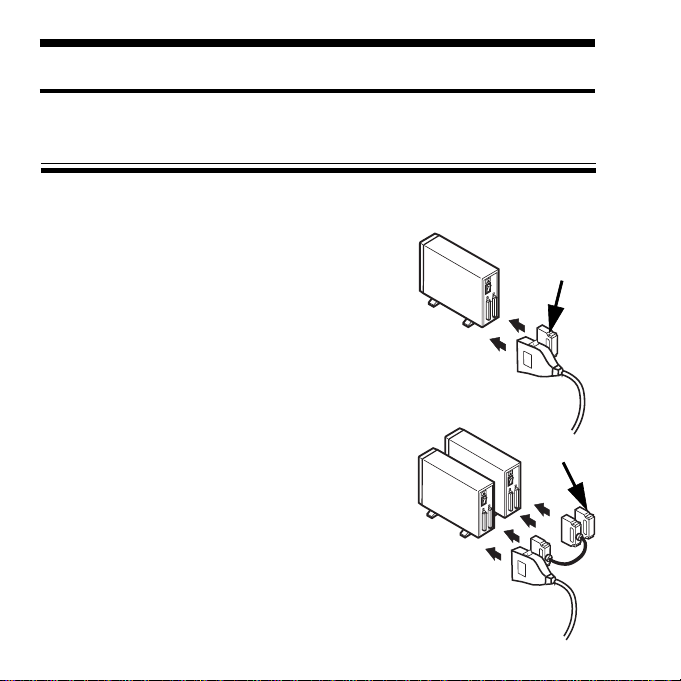
Terminator
The fig.1 shows how to connect a terminator and
the U2SCXU when you connect only one SCSI
device.
The fig.2 shows how to connect a terminator and
SCSI cable and the U2SCXU when you connect
daisy-chain SCSI devices. Terminator
This chapter explains how to connect a SCSI device to the U2SCXU.
Follow the steps through to connect your SCSI device to the U2SCXU:
Fig. 2
Fig. 1

5
1)Make sure the SCSI device is in Power-OFF state.
2) Decide whether you daisy-chain SCSI devices or not.
2-1)If you connect two or more SCSI devices, set them as follows:
Daisy-chain them and attach an external active terminator to the last
SCSI device, as Fig.2 shows. Turn off the terminator switches on all of
the SCSI devices if the SCSI devices have internal terminator switches.
If you are not sure how to turn off terminator switches, refer to
the user’s manual that accompanied your SCSI device.
2-2)If you connect only one SCSI device, set it as follows:
If the SCSI device doesn’t have an internal terminator switch, attach an
external active terminator to the SCSI device; Otherwise, turn on
an internal terminator switch. If you are not sure how to turn off
the terminator switch, refer to the user’s manual that accompanied your
SCSI device.
3)Next, connect the U2SCXU to the first(or only) SCSI device.
If you have a SCSI device with a Low-Density Centronics 50 pin
or DB25 connector, use an adapter available from us.
In such a case, refer to Chapter 6.
4)Make sure each SCSI device has a SCSI ID except 7. You can usually
change a SCSI ID with a switch on the back of SCSI devices. For more
information, refer to the user’s manual that accompanied your SCSI device.
5)If you use a PC, proceed to Chapter 2-2.
If you use a Mac, proceed to Chapter 2-8.
Table of contents
Other Ratoc Systems Media Converter manuals

Ratoc Systems
Ratoc Systems RAL-DSDHA2 User manual

Ratoc Systems
Ratoc Systems REX-USB61 User manual

Ratoc Systems
Ratoc Systems RAL-KEB02iP User manual

Ratoc Systems
Ratoc Systems FR1SX User manual

Ratoc Systems
Ratoc Systems USB-Serial Converter REX-USB60F User manual

Ratoc Systems
Ratoc Systems U2SCX-LVD User manual

Ratoc Systems
Ratoc Systems USB-Serial Converter REX-USB60 User manual


