
Princess 0118208501001 User manual

!"#$%&'
!" ()!)*!+
# ,!)!'!'
$ ()!
%& ()!&)
'& (!!!
$( ,#-'
)$ ./-)+01
% #%"2'
$* ./-) +0!
3454673685345334
$&+,-+'"!"."
5
9
7 8
6
4
12
3
ĘŚ !
" !

Instruction manual
3
SAFETY
• By ignoring the safety instructions, the
manufacturer cannot be held responsible for
any damage.
• If the supply cord is damaged, it must be
replaced by the manufacturer, its service
agent or similarly qualified persons in order
to avoid a hazard.
• Never move the appliance by pulling the
cord and make sure the cord cannot
become entangled.
• The appliance must be placed on a stable,
level surface.
• The user must not leave the device
unattended while it is connected to the
supply.
• This appliance is not intended for use by
persons (including children) with reduced
physical, sensory or mental capabilities, or
lack of experience and knowledge, unless
they have been given supervision or
instruction concerning use of the appliance
by a person responsible for their safety.
• Close supervision is necessary when any
appliance is used by or near children.
• WARNING: Spilled food can cause serious
burns. Keep appliance and cord away from
children. Never drape cord over edge of
counter, never use outlet below counter, and
never use with an extension cord.
• The use of accessory attachments not
recommended by the appliance
manufacturer may cause injuries.
• Do not use outdoors.
• Do not place on or near a hot gas or electric
burner, or in a heated oven.
• Do not clean with metal scouring pads.
Pieces can break off the pad and touch
electrical parts, creating a risk of electric
shock.
• Use extreme caution when removing tray or
disposing of hot grease.
• Extreme caution must be used when moving
an appliance containing hot oil or other hot
liquids.
• CAUTION: To protect against damage or
electric shock, do not cook in the base unit.
Always use the provided baking pan to cook.
• Always ensure the appliance is properly
assembled before use.
EN

Instruction manual
4
• Care should be taken when removing the
baking trays, it’s recommended to use oven
mittens.
• To avoid possible damage from steam, place
the unit away from walls and cabinets during
use.
• This appliance is intended to be used in
household and similar applications such as:
• Staff kitchen areas in shops, offices and other
working environments.
• By clients in hotels, motels and other residential
type environments.
• Bed and breakfast type environments.
• Farm houses.
• Children shall not play with the appliance.
• This appliance shall not be used by children.
Keep the appliance and its cord out of reach of
children.
• To protect yourself against an electric shock, do
not immerse the cord, plug or appliance in the
water or any other liquid.
• Do not heat the food for too long.
• The connector must be removed before the
appliance will be cleaned, please make sure the
inlet is completely dry before the unit will be
used again.
• Surface is liable to get hot during use.
• WARNING: If the surface is cracked, switch off
the appliance to avoid the possibility of an
electric shock.
• The temperature of accessible surfaces may be
high when the appliance is operating.
• The appliance is not intended to be operated by
means of an external timer or a separate
remote-control system.
• The appliance is to be connected to a socket-
outlet having an earthed contact (for class I
appliances).
• In order to prevent disruptions of the airflow do
not put anything on top of the appliance and
make sure there is always 10 centimetres of
free space around the appliance.
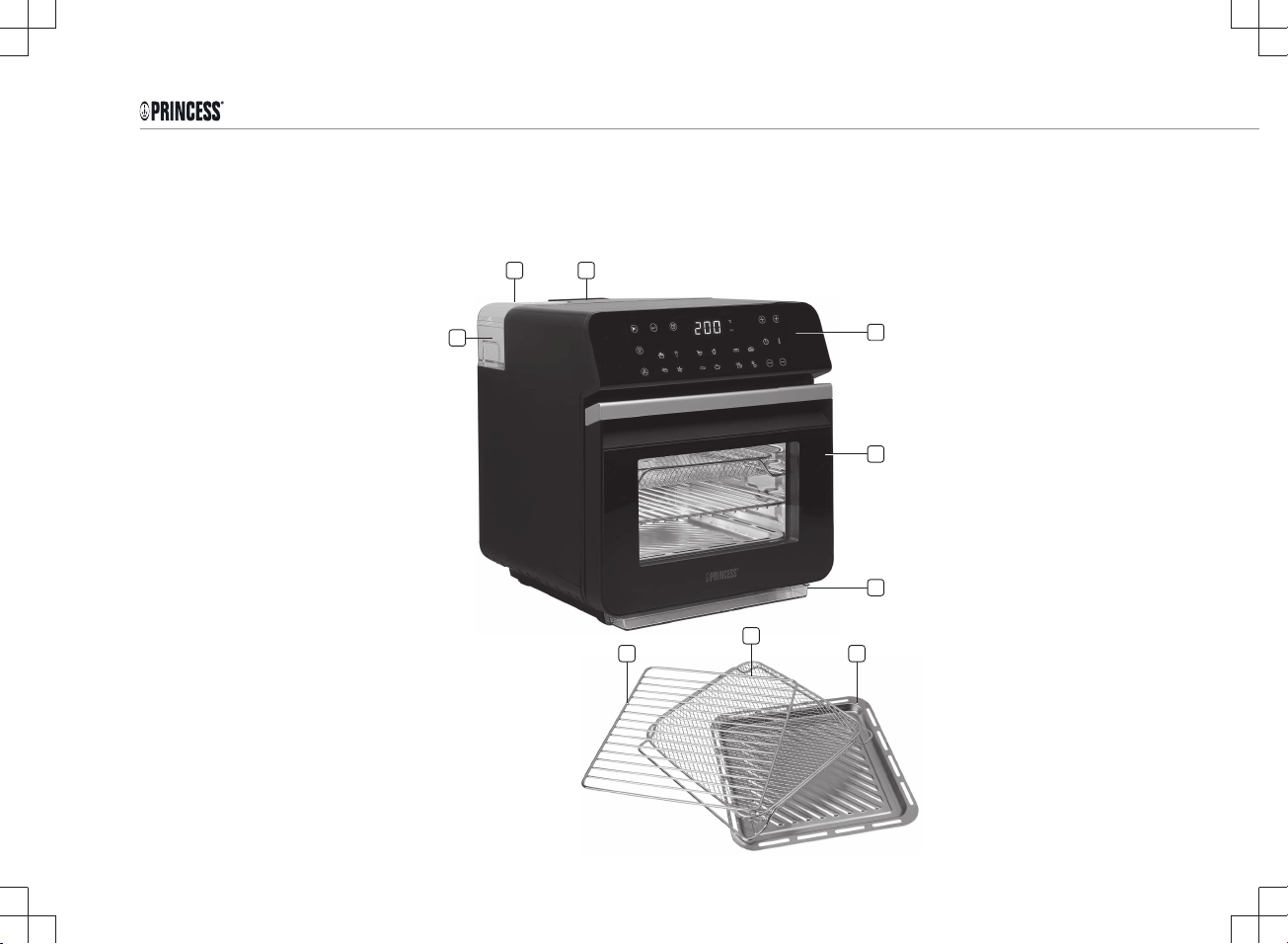
PARTS DESCRIPTION
1. Heat outlet
2. Tank cover
3. Water tank
4. Display
5. Oven door

Instruction manual
5
6. Baking net
7. Grill tray
8. Baking tray
9. Condensation tray
BEFORE THE FIRST USE
• Remove all packaging material.
• Remove any stickers or labels from the appliance.
• Thoroughly clean the parts with hot water, some washing-up
liquid and a non-abrasive sponge.
• Wipe the inside and outside of the appliance with a moist cloth.
• Place the appliance on a stable, horizontal and level surface, do
not place the appliance on non-heat-resistant surfaces.
•Use only fresh, cold tap water, softened water or carbonated
mineral water for filling the water tank,
• Before the first time use it is recommended to let it the appliance
operate in steam mode for 15 minutes without any food inside.
See instructions in this manual under the section “USE”. When in
use for the first time, the pump may produce a loud vibration
sound, this is normal and the sound will fade.
Note: When the device is turned on for the first time, a slight odour
will occur. This is normal, ensure adequate ventilation. This odour is
only temporary and will disappear soon.
OPERATION
Functions on the Display
Start
• Press the Start icon to activate the display when it is in standby
mode.
• Press the Start icon to start an operation.
Return
• Press the Return icon to return to the last step.
• Press the Return icon to stop an operation.
Start Timer
• Press the Start Timer icon, then use the Time + and – icons to
set the desired starting time. The timer can be set to start
between 30 mins to 6 hours. More instructions under the section
“USE”.
Active Timer indicator
• The timer indicator will flash in the display when the timer has
been activated. More instructions under the section “USE”.
/
Time and Temperature display
EN

Instruction manual
6
• Displays the cooking time or temperature.
Time + and -
• Use the Time + and - icons to increase or decrease the cooking time
in 1-minute increments. The cooking time can be set between 1 – 90
minutes.
• Press and hold the Time + or - icons for rapid increase/decrease of the
time.
• The time can be also be adjusted while the appliance is in operation.
Temperature + and -
• Use the Temperature plus and minus icons to increase or decrease
the temperature by 5°C increments. The temperature can be set
between 80°C - 200°C.
• Press and hold the plus or minus icons for rapid increase/decrease of
the temperature.
• The temperature can be also be adjusted while the appliance is in
operation.
Light
• Use the light icon to turn the oven lamp on or off.
Steam Cleaning
• Press the steam cleaning icon to automatically clean the appliance.
Water Level Warning
• The Water Level Warning icon will illuminate and an alarm bel will be
heard for 3 minutes when the tank is empty and the steam function is
selected. Please re-fill the water tank when this happens then press
start to continue the operation. If no water is added, the operation will
automatically end.
•Note: The water tank capacity is 1150mL, filled with water it can run
more than 60 minutes, however the length of time the water lasts may
vary depending on the ingredients being used.
Steam
• Press the STEAM icon to activate the Steam function.
Air Fry
• Press the AIR FRY icon to activate the Air frying function.
Steam/ Air Fry Combi
• Press the Steam/ Air Fry Combi icon to activate the Steam and Air Fry
function simultaneously, the Air Fryer will begin with steaming then
switch to air frying.
“In Operation” indicators
• Runs consecutively in the display when the appliance is in operation.

Instruction manual
7
Limescale Indicator
• The limescale indicator will illuminate when there is a limescale
build up in the appliance and a steam cleaning in required.
9 Pre-set Cooking Programs
BAKE, FRIES, RICE, VEGETABLES, BREAD, STEAK,
DRUMSTICKS, FISH, WHOLE CHICKEN.
• Touch the icon of the desired pre-set cooking program. The pre-
set time and temperature for the selected program will show
alternatively in the display.
• See the chapter ‘Pre-Set cooking Programs’ for more information.
Air Fry pre-set
programs
Steam pre-set
Programs
Steam/ Air fry
Combi pre-set
programs
Bake Rice
Bread
Fries Vegetables Steak
Drumsticks Fish Whole Chicken
Use
• Put the mains plug in an earthed wall socket.
• Open the oven door, place the tray with ingredients to be cooked
onto desired rack in the oven and close the oven door.
• Touch the start icon to activate the display.
• From here you can choose for either for Air Frying, Steaming or
for both by using the COMBI feature.
AIR FRYING
• Press the Air Fry icon or use one of the Air-frying pre - sets
(bake, fries or drumsticks).
Tip: If you need to preheat the appliance, you can preheat it without
putting food in it. Just set the cooking time for 3 minutes longer than
the expected cooking and add the food after the 3-minute pre-heating
phase.
• Use the pre-set values or adjust using the Time + and - and the
Temperature + and - icons to set the desired time and
temperature.
• Press the Start button to start the operation. The ‘’In operation’’
indicators will run in the display and the operation will start.
Note: For best results, some ingredients require turning halfway
through the preparation time. To turn the ingredients -
• Open the oven door halfway through the operation, the operation
will stop.
• Use oven mittens to remove the baking tray and turn the
ingredients as needed.
• Place the baking tray back into the appliance and close the door,
the operation will resume automatically.
EN

Instruction manual
8
• Do not touch the inside the appliance during and sometime after use
as it gets very hot.
STEAMING
Note: When steaming, please ensure that the steam outlet located on the
inside left of the baking area is not blocked with anything and that water
tank is has adequate water in it.
• Remove the water tank from the appliance.
• Open the cover and fill the water tank with water.
• Do not overfill the tank and pay attention to the MAX water level
indicator.
• Always fill with pure water as this helps to delay a limescale build-up.
• Make sure to properly secure the tank cover then attach the water tank
back onto the appliance.
• Press the STEAM icon or use one of the Steaming pre-sets (Rice,
Vegetables, or Fish)
• Use with the pre-set value for the time or adjust the time using the
Time + and – icons. The temperature will be automatically set to
100°C and cannot be adjusted in Steam mode.
• Press the Start icon to start the operation. The ‘’ In operation’’
indicators will run in the display and the operation will start.
Steam/Air Fry Combi
Use the Steam/Air Fry function if you want to STEAM then AIR FRY your
food consecutively. The food will first be steamed then Air fried. You must
first set the steaming time, then set the air frying time and temperature.
• Make sure that there is adequate water in the water tank.
• Press the Steam/Air fry Combi icon or one of the combi pre-sets
(Bread, Meat or Whole Chicken)
• Use the default settings or Set the steaming time by using the Time +
and - icons. (The default steam temperature is 100°C and cannot be
adjusted).
• Press the Start icon to switch to Combi Air Fry programming.
• Set the air frying time and temperature using the Time and
Temperature + and - icons.
• Press the Start icon to start the operation.
• When the Air frying, Steaming or Combi operation is complete the
appliance will beep 5 times.
• Open the oven door and carefully remove the baking tray with
ingredients from the appliance using oven mittens.
• Unplug the appliance and allow it to cool down completely before
cleaning.
Using the Start Timer
You can use the start timer to set a time for an operation to begin. The
timer can be set to start within 30 minutes to 6 hours.
Note: Please evaluate how long the food can be kept at room
temperature. To prevent food spoilage and not affect the taste, it is
advised that the time should not exceed 2 hours.
• Press Start to activate the display.
• Press the Start Timer icon.

Instruction manual
9
• Use the Time + and – icons to set the desired starting time
(30mins to 6 hours).
• Press the Start icon.
• Choose the desired cooking program, make any desired
adjustments to the cooking time and temperature then press the
Start.
• The display will show the countdown and the operation will begin
when the countdown is over.
To cancel the Start Timer-
• Unplug the appliance to cancel a timer setting or when the
display is showing the timer settings and the in-operation
indicator is active, press the return icon, then press the start timer
icon then press the start icon.
Note: When the product is not in use for 20 seconds, the appliance
will return to standby mode. Activate it again by pressing the Start
icon.
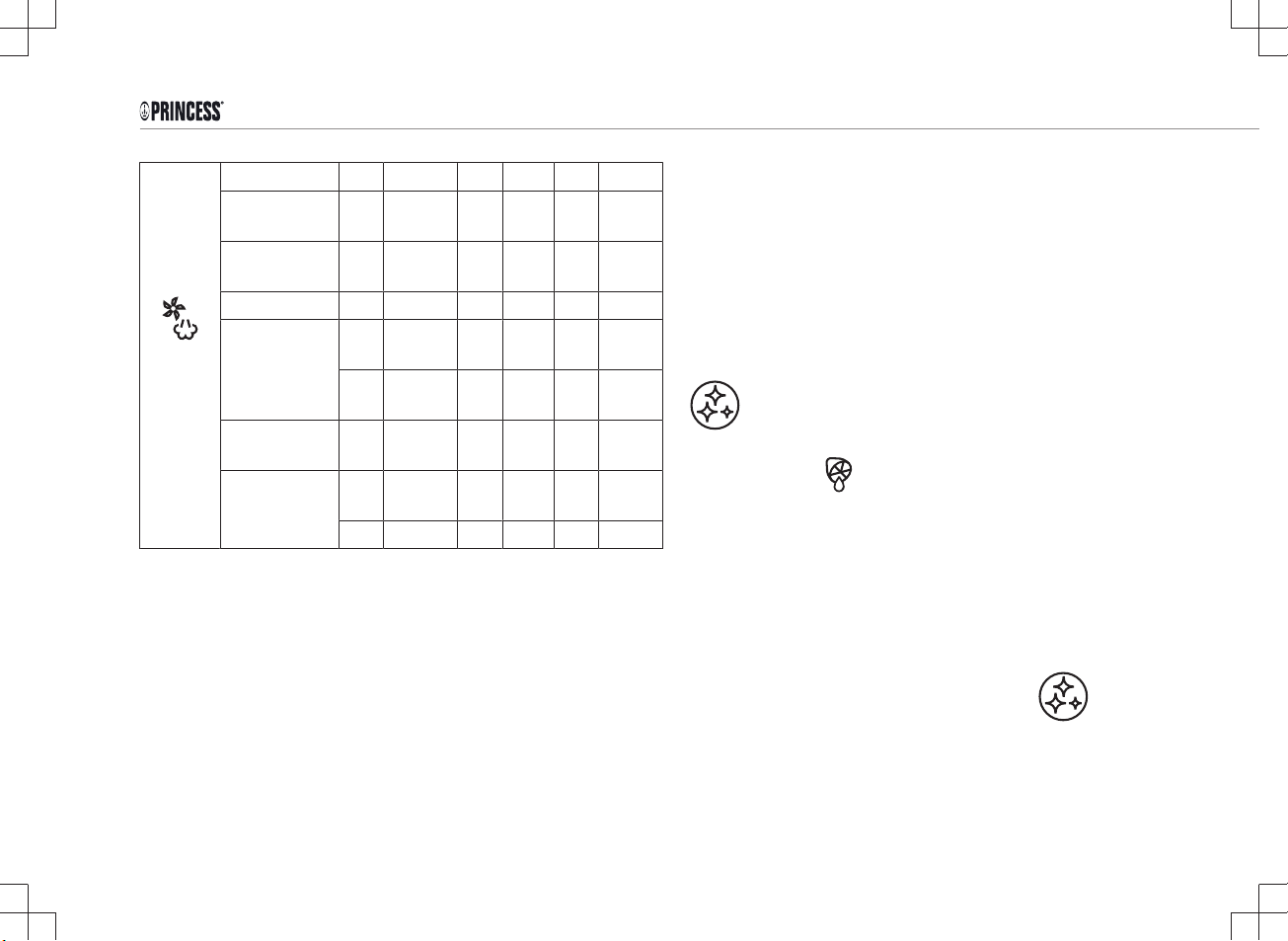
PRE-SET COOKING PROGRAMS
Function Pre - set
program
Min
utes
°C Manual
Adjustmen
t Range
-Steam
Minutes °C
Manual
Adjustment
Range - Air
Fry
Minutes °C
STEAM
Vegetables 22 100 1 -
90
100 - -
Fish 10 100 1 -
90
100 - -
Rice /pasta/
grain
25 100 1 -
90
100 - -
AIR-FRY
Fries 20 200 - - 1 -
90
80 -
200
Cake 45 160 - - 1 -
90
80 -
200
Drumsticks 20 200 - - 1 -
90
80 -
200
EN
Instruction manual
10
COMBI
(1st
Steam
then Air
fry)
Meat
(Steam) 5 100 1 -
90
100 - -
(Air fry) 10 200 - - 1 -
90
80 –
200
Bread
(Steam)
ↆ
(Air Fry)
3 100 1 -
90
100 - -
40 40 1 –
90
100 1 –
90
40 -200
Chicken
(whole)
(Steam)
ↆ
(Air Fry
20 100 1 –
90
100 1 -
90
80 -
200
10 200 - - - -
CLEANING AND MAINTENANCE
• Before cleaning, unplug the appliance and wait for the appliance to
cool down.
• Use a soft damp cloth to wipe clean the exterior of the appliance.
• Use a small brush or cotton swab if necessary. Never pour any liquid
into the base of the unit.
• Wash the removable parts in warm soapy water with a soft cloth or
sponge.
• Note that the baking trays are dishwasher safe. However, we
recommend to wash them by hand as this will be beneficial for the
lifetime of the product.
• After using the appliance for a period of time, the inside of the water
tank may breed bacteria, please clean the inner wall of the water tank
regularly.
• Dry each piece thoroughly.
• Never use harsh chemical detergents, scouring pads or powders on
any of the parts or accessories.
Limescale Steam Cleaning
The limescale icon will illuminate when a steam cleaning is required.
The steam cleaning function can clean the interior of the appliance to a
certain extent under the action of high temperature steam, especially for
some places that cannot be cleaned directly with a cloth. You must allow
the cleaning process to run its course completely. It can be done using
only water or with water and a descaling solution.
• Fill the water reservoir up to the MAX level with water and add a
descaling solution according to the instructions of the descaler.
• Press Start then press the Self-cleaning icon.
• Press the Self-cleaning icon. Cleaning will begin and last for 20
minutes.
• Empty the water from condensation tray.
This manual suits for next models
1
Table of contents
Languages:
Other Princess Oven manuals

Princess
Princess DeLuxe 01.182075.01.001 User manual

Princess
Princess 112370 User manual

Princess
Princess 112359 User manual

Princess
Princess 112459 User manual
Princess
Princess 112371 User manual

Princess
Princess 01.183314.01.7 User manual

Princess
Princess 01.183026.01.001 User manual

Princess
Princess 112361 User manual

Princess
Princess 182065 User manual


