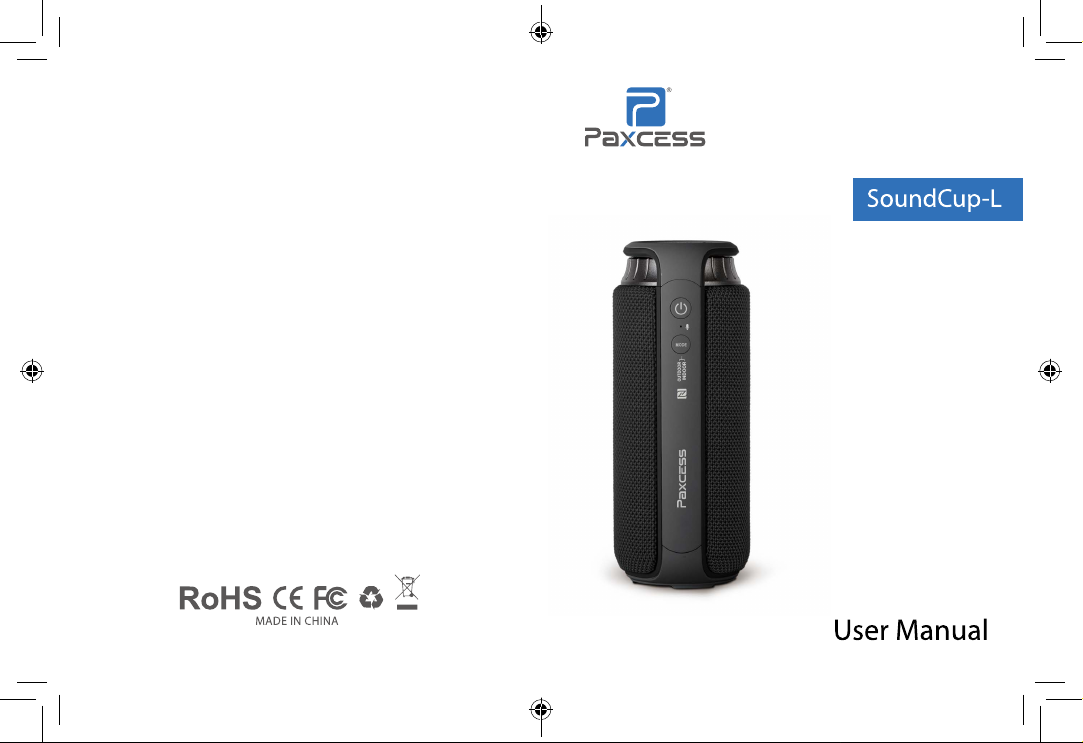
Paxcess SoundCup-L User manual

Contents
SoundCup-L 说明书
尺寸 : 85x110mm
材质 : 封面,内页 128g 铜版纸
装订方式 : 打钉
此页不做印刷
Chinese ---------------01~06
English----------------07~12
Japanese --------------13~18
German ---------------19~24

01 02
包装内容
1x SoundCup-L 蓝牙音箱
1x 用户手册
1x USB 充电线
1x AUX 3.5mm 音频电缆
功能描述
SoundCup-L 是一款便携式的蓝牙音响。它可以通过蓝牙连接其他设备,如智
能手机、平板电脑或者是个人电脑,随心所欲播放您爱听的音乐。它搭配高性
能聚合物锂电池和无源散热器,可以连续播放 6-7 个小时,续航时间更长。它
操作简单,携带方便,无需线的束缚,让你随时随地享受音乐盛宴。
连接方法:
开机几秒钟后,触摸屏上的 LED 灯快闪,表明音箱已处于蓝牙配对模式。
外部音频连接 :
1、找到手机蓝牙。
2、开启手机蓝牙设置并扫描新的蓝牙设备。
3、点击设备配对的名字“SBL 24 A1”进行配对。
4、如果您的手机需要配对码,请输入“0000”并确认。
5、成功配对后,扬声器发出提示音,LED 蓝灯长亮。
说明:
不同手机配对时间不同。只需要在第一次配对,它会自动连接已经配对 的设备
(蓝牙设备可以记住最后 8 个配对设备的名称)
AUX-IN 连接
在开机的状态下,将外接设备 ( 如:手机,电脑,MP3 等音频输出设备 ) 音插
头插入“AUX”,此时音箱会自动切换到外部音频输入模式,绿色 LED 指示长亮,
播放设备上的音频即可。
低电量提示
充电口红色 LED 灯闪烁,表示电量低(电池只剩 10%)。用户需要及时向蓝
牙音响充电。
CHINESE
03 04
电气规格
• 无线传输范围:可达 10 米以上
• 声道:双声道
• 防水:IPX4
• 信噪比 S / N:≥ 80dB
• 频率范围:180 Hz20 KHz
• 失真度 THD:≤ 1%
• 扬声器单元:外径 45mm,内磁铁,4Ω,10W x 2
电源参数
• 电池:内置锂电池,4000mAh
• 充电电压 / 电流:5V±0.25V / 1A
• 充电时间:4 〜 5 小时
• 播放时间:7 〜 8 小时
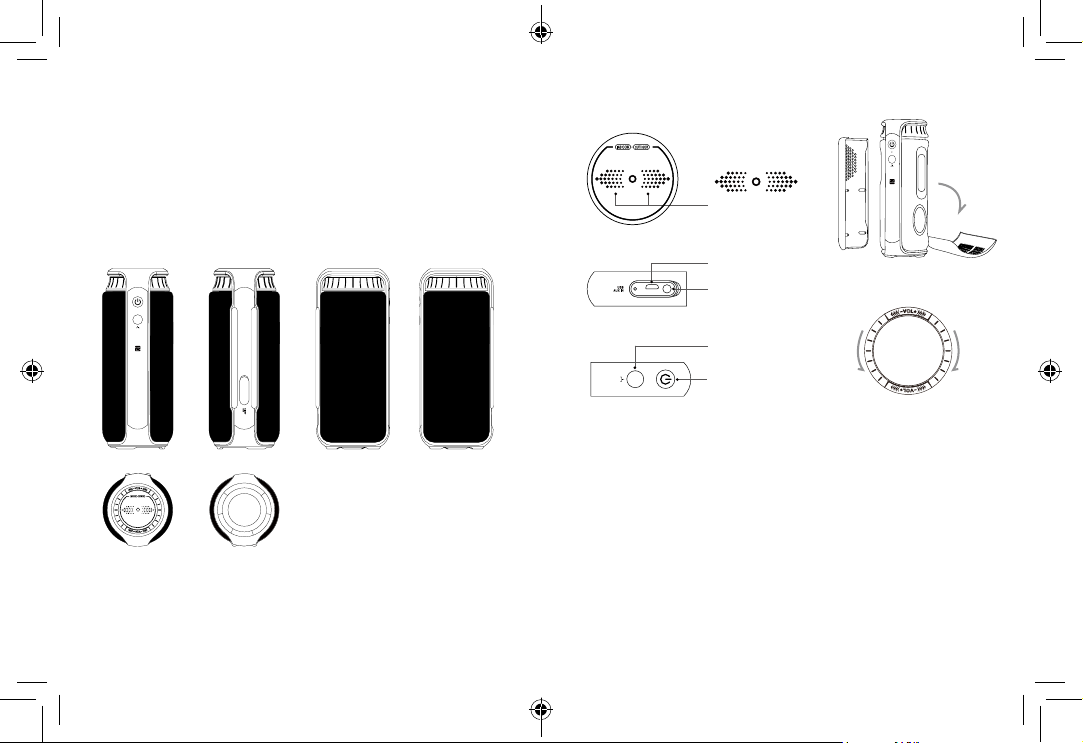
功能分析
MODE
OUTDOOR
INDOOR
滑动 上一曲 / 下一曲
USB 接口
音频输入
电源开关 播放
/ 暂停 & 免提通话
Mode Change Button
(OUTDOOR / INDOOR)
可更换的面料外壳
模式选择按钮 (室内 / 户外)
旋转音量按钮
MODE
OUTDOOR
INDOOR
充电
将 micro USB 充电电缆连接到计算机或 USB 充电器,红色 LED 充电状态指示。
充电完成后,红色 LED 指示灯熄灭。 (充电时间 4 〜 5 小时)
音箱接口
扬声器接口
音频输入连接器:3.5mm
AUX 电缆:支持辅助外部音频输入。
充电接口:Micro USB; 输入 5V
外形尺寸和基本参数
长度:77.8mm±0.2mm
宽度:74.7mm±0.2mm
高度:190.8mm±0.2mm
材质:ABS + 面料
重量:560g+5g
前
顶
后
底
左 右
MODE
OUTDOOR
INDOOR
05 06
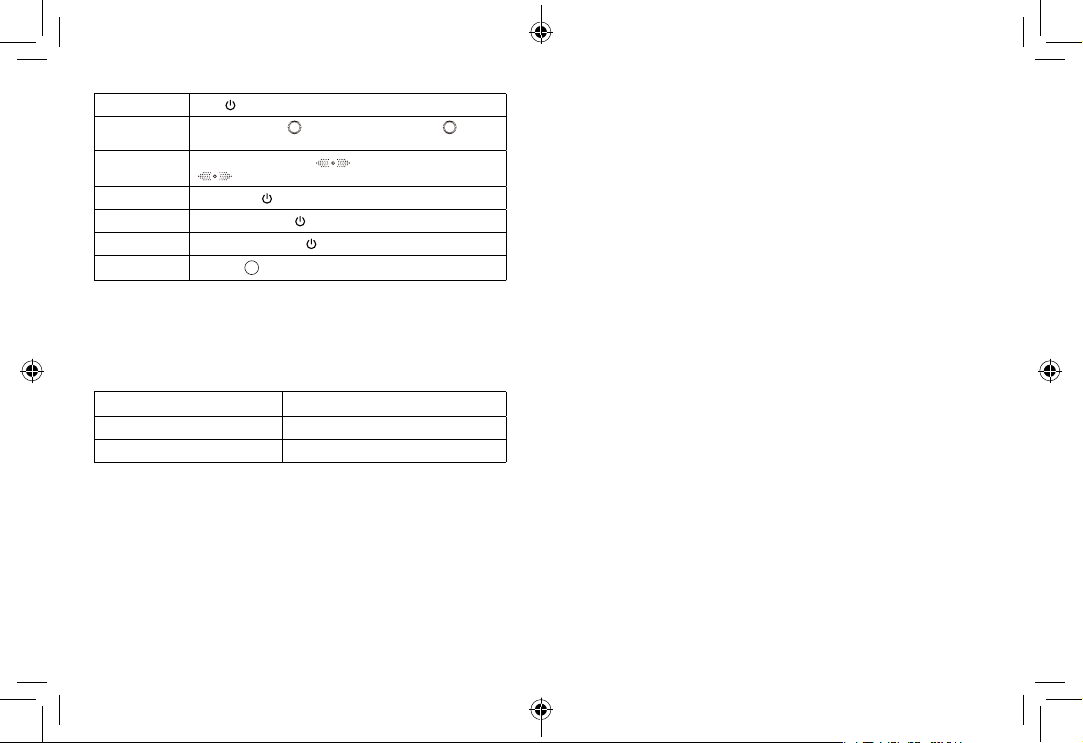
电源开关 长按 按钮开关电源 .
音量增减 顺时针旋转音量键 增大音量,逆时针旋转音量键 减小音
量
下一首 / 上一首 在蓝牙模式下,向右滑动 , 播放下一首;向左滑动
,播放上一首。
播放 / 暂停 播放时,短按 播放和暂停
接听电话 当电话进来时,短按 接听电话,再按挂断电话
拒绝接听 当电话进来时,快速按 两次拒绝接听
EQ 模式选择 选择按钮
MODE
选择,按照图标提示选择 EQ 模式
使用环境 储存环境
温度:0ºC ~ 40ºC 温度: -30º C ~ 60º C
湿度:0% 〜 85% 湿度: 0% ~ 90% RH
说明:
1. 在蓝牙模式时,当 3.5mm 音频插头插入时,蓝牙音响将自动切换为音频输
入状态。
2. 在不使用时,请关闭蓝牙音响,防止电量流失。
问题解答
1、我的手机找不到新的蓝牙设备?
a) 确保蓝牙音响进入配对模式;
b) 确保蓝牙音响在有效工作范围内;
2、蓝牙设备不能配对
a) 确保你的手机允许新的连接,并且它不能达到允许的最大连接数。请参阅您
的手机用户手册
b) 确保输入的配对密码是“0000”。如果您使用蓝牙发射器设备,请确保您的
蓝牙发射器响应密码支持“0000”代码。
3. 当连接到一个蓝牙设备时,我的蓝牙音响不能播放音乐 / 接听电话?
a)确保你的手机蓝牙支持 A2DP 和 HSF(免提)协议;
b) 确保您的蓝牙手机在有效工作范围内;
4. 当与我的电脑配对时,Windows 要求新的驱动程序? 你能供应吗?
我们不能供应。 蓝牙 A2DP / HSF 驱动程序可能需要通过蓝牙连接播放立体声。
但是驱动程序实际上需要在您的 PC 上的蓝牙模块,而不是扬声器。 不同的蓝
牙模块可能需要不同的驱动程序。 请与您的 PC 或蓝牙模块的制造商联系以更
新驱动程序。
5. 当播放音乐时,为什么我无法远程控制暂停、播放、切换歌曲和跳过曲目等
功能?
a)当您使用 3.5mm AUX 音频连接时,您无法使用扬声器上的按钮暂停,更改
音量或跳过曲目 ;
b)此功能需要与蓝牙音响配对的蓝牙设备才能支持 AVRCP(音频 / 视频远程
控制配置文件)。 请确保您的手机或其他蓝牙设备支持 AVRCP。
安全注意事项
在使用蓝牙音响之前,请阅读以下建议。
a)保持干燥,不要将其置于潮湿的地方,以免影响产品的内部电路。
b)保持产品远离阳光直射或热的地方。 高温会缩短电子设备的寿命,破坏电
池或扭曲某些塑料部件。
c)不要将本产品暴露在极冷的地方。 否则可能会损坏内部电路板。
d)不要试图拆卸产品,因为如果您不专业,可能会损坏产品。 内部电路可能损坏。
f)不要使用强化学品或洗涤剂清洁产品。
g)不要用锋利的尖端刮擦表面。

07 08
ACCESSORIES
1x SoundCup-LBluetooth Speaker
1x User Manual
1x USB Charging Cable
1x AUX 3.5mm Audio Cable
HIGHLIGHTS
SoundCup-L is a compact Bluetooth speaker that can be wirelessly connected
to Bluetooth devices such as smartphones, tablets and computers to playback
any musiccollection stored on them. Thanks to the powerful batteryand passive
radiator, the system delivers typical bass sound.Different from other mains
supply, it can support about 7 to 8 hours’ play time and is the perfect companion
for you to put at home, or for camping. The processcontrol helps you get rid of
complicatedconnections and wiringdistance constraints. Therefore, users can enjoy
high-qualitymusic anytime and anywhere.
BLUETOOTH CONNECTION
Turn the speaker on by pressing the power for severalseconds, then the blue led
ashes quickly. The speakernow has entered the Bluetooth pairing mode.
CONNECT TO MOBILE PHONES/TABLET PCs/COMPUTERS
• Activate your phone's Bluetooth.
• Go to your phone's Bluetooth settings, scan for newBluetooth devices.
• Upon device found (SBL 24 A1), click the device nameand pair with it.
• If your phone ask for pairing code , please enter ”0000”and conrm it.
• After successful pairing, the speaker will make a promptsound and the LED light
turns blue.
Note:
Pairing time is varied with dierent mobile phones. It onlyneeds pairing at the rst
time and it will auto connect thedevices which have already been paired before (The
speakeronly can remember the last 8 paired devices’names)
AUX AUDIO-IN CONNECTOR
The speaker also features 1x AUX audio in port, simply connect the speaker with
your non-Bluetooth mobile phone/MP3 player/PC/laptop with the 3.5mm jack
ENGLISH
09 10
DIMENSIONS AND BASIC PARAMETERS
Length: 77.8mm ± 0.2mm
Width: 74.7mm± 0.2mm
Height: 190.8mm ± 0.2mm
Material: ABS+Fabric
Weight: 560g ± 5g
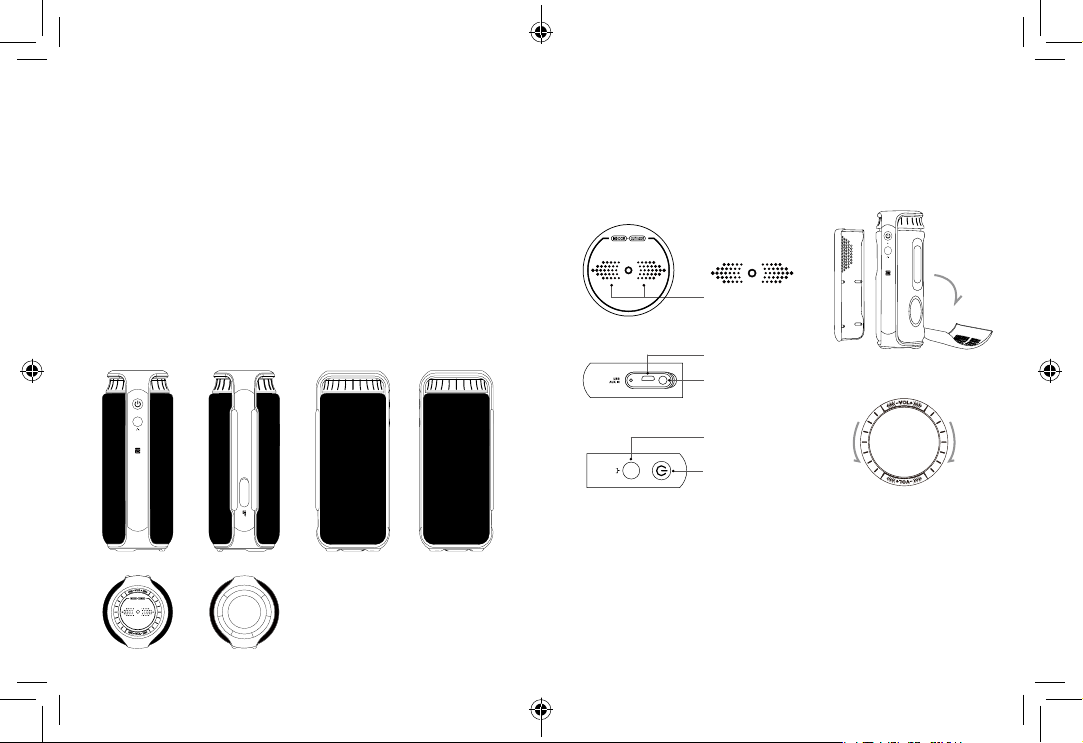
FUNCTION ANALYSIS
ELECTRICAL SPECIFICATIONS
• Bluetooth Compatibility: It is compatible with Bluetooth 4.1Class II and supports
A2DP V1.2, AVRCP V1.4 profiles agreement.
• Transmission distance: up to 10 m
• Sound track: dual track
• Water Resistant: IPX4
• Signal to noise ratio S / N: ≥80dB
• Frequency Range: 180Hz-20KHz
MODE
OUTDOOR
INDOOR
Slide Next/Previous
USB Charging
LINE IN
Power ON/OFF
Play / Pause &
Calls Handsfree
Mode Change Button
(OUTDOOR / INDOOR)
Fabric Covering replaceable
Rotary Volume +/-
MODE
OUTDOOR
INDOOR
audio cable. The green light will be on, and then you can play music via wired
connection.
Low power indication
The speaker will indicate a beep sound to remind you to charge if battery is low
(battery only left 10%).Users need to charge the speaker timely.
CHARGING
Connect the micro USB charging cable to a computer or USB charger, red LED
indication for charging status. Red LED goes o upon charging nished. (4~5 hours
for charging)
SPECIFICATIONS
Speaker Interfaces
Audio input connector: 3.5mm
AUX cable: support aux external audio input.
Charging interface: Micro USB; Input 5V
Front
Top Bottom
Back Left Right
MODE
OUTDOOR
INDOOR
11 12
1. My mobile phone can't nd any new Bluetooth devices?
a) Make sure the Bluetooth speaker has entered pairing mode;
b) Ensure the speaker is within the eective working range;
2. Bluetooth devices can't pair up
a) Make sure your mobile phone allows new connection, did not reach the
maximum allowed connection number, please ref to your mobile's user manual
b) Make sure you click the right Bluetooth pairing name.
3. My mini speaker does not play music / answer call when it connected to a
Bluetooth mobile phone?
a) Make sure your Bluetooth mobile phone supports A2DPand HSF(hands-free)
prole;
b) Ensure your Bluetooth cell phone is within eective working range.
4. When paired with my computer, windows ask for new driver? Can you supply?
a) We can't supply. The Bluetooth A2DP/HSF drivers may require playing stereo
sound via BluetoothConnection. But the driver is actually needed for the
Bluetooth module on your PC, instead of the speaker. Dierent Bluetooth module
may require different drivers. Please contact your PC or Bluetooth module’s
manufacturer for driver update.
5. Why can’t I remotely control the pause, play, previous song and skip track
functions with the speaker when playing music?
a) When you are using 3.5mm AUX audio in connection, you can’t pause, change
volume or skip tracks with the buttons on the speaker;
b) This feature needs the Bluetooth devices paired with the speaker to support
AVRCP (Audio/Video Remote Control Prole). Please make sure your cell phone or
other Bluetooth device supports AVRCP.
SAFETY NOTICES
Read the following recommendations before using the Bluetooth speaker.
a) Keep it dry and don’t take it to damp places to avoid the product’s internal circuit
being aected.
b) Keep the product away from direct sunlight or hot places. High temperatures
will shorten the life of electronic devices, destroy the battery or distort certain
plastic parts.
c) Don’t expose the product to extremely cold area. It may damage the internal
circuit board.
d) Don’t try to disassemble the product as it may get damaged if you are not
professional. The internal circuit might get damaged.
f) Don’t use intensive chemical products or detergent to clean the product.
g) Don’t scratch the surface with sharp tips.
Powering ON / OFF Long press to power on / o.
Volume - or + Turn clockwise to turn up the volume and
counterclockwise to turn the volume down.
Next/Previous In the bluetooth mode, slide to the right to get to the next
track and to the left to get to the previous track .
Play/Pause When playing music, press short to Pause/Play.
Answering a call When a call comes in, press short to pick up the call
and press it again to hang up.
Refuse a call When a call comes in, press twice “quickly” to refuse
the call.
EQ mode Press
MODE
to select the mode to OUTDOOR or INDOOR,
the icon will be illuminate accordingly.
WORKING TEMPERATURE STORAGE CONDITION
Temperature: 0º C ~ 40º C
Humidity: 0% ~ 85% RH
Temperature: -30º C ~ 60º C
Humidity: 0% ~ 90% RH
Note:
1. Under Bluetooth mode when the 3.5mm audio plug is inserted, the speaker will
switch to line in status automatically;
2. Please turn o the speaker if you don’t use it to prevent power drain.
TROUBLE SHOOTINGS
• Distortion THD: ≤ 1%
• Speaker unit: outer diameter 45mm, inner magnet,4Ω, 10W x 2
Parameters of power
• Battery: built-in lithium battery, 4000mAh
• Charging Voltage/Current: 5V ± 0.25V / 1A
• Charging time: 4~5 hours
• Playing time: 7~8 hours

13 14
付属品
1x サウンドカップ -L Bluetooth スピーカー
1x ユーザーマニュアル
1x USB 充電ケーブル
1x AUX 3.5mm オーディオケーブル
特徴
サウンドカップ -L は、スマートフォンやタブレット、コンピューターなどにワイ
ヤレスに接続し、それらに内蔵された音楽を再生することができる、コンパクトな
Bluetooth スピーカーです。パワフルな充電、パッシブラジエータにより、本スピー
カーは長時間再生とパワフルな BASS サウンドを実現します。他の製品と異なり、
7 から8時間の再生時間が可能となり、ご自宅やキャンプ先の最適な友となります。
簡単な操作で、複雑な接続やケーブル回線の長さなどの制限を取り除いています。
これにより、ユーザーは高品質の音楽をどこでもいつでも楽しむことができます。
BLUETOOTH 接続
電源ボタンを数秒間押すことでスピーカーの電源をオンにし、電源ボタンに青色
LED ライトが点滅します。スピーカーは Bluetooth ペアリングモードに入ります。
CONNECT TO MOBILE PHONES/TABLET PCs/COMPUTERS
• あなたの携帯の Bluetooth を有効化してください ..
• 携帯の Bluetooth 設定で、新しい Bluetooth デバイスを検索します
• デバイス (SBL 24 A1) を見つけたら、デバイス名をクリックし、ペアリングします。
• もし携帯がペアリングコードを訪ねてきたら , “0000”を入力してください。
• ペアリングが完了したら、スピーカーから完了を表すサウンドが鳴り、LED ライ
トが青色に変わります。
注:
ペアリング時間は携帯電話によって異なります。ペアリングは初回接続時だけ必要
となり、以降は自動的に接続されます。(スピーカーは直近までの履歴の8デバイ
スを覚えることができます)
AUX AUDIO-IN 接続
スピーカーは 1x AUX オーディオポートを持ち Bluetooth 非対応の携帯 /MP3 プレイ
ヤー / コンピューター / ラップトップ等にも、3.5mm ジャックオーディオケーブル
を通して接続することができます。緑色のインジケーターの光が付き、回線接続状
態で音楽を楽しむことができます。
JAPANESE
15 16
寸法と基本パラメーター
縦幅 : 77.8mm ± 0.2mm
横幅 : 74.7mm± 0.2mm
高さ : 190.8mm ± 0.2mm
材質 : ABS+ 生地
重さ : 560g ± 5g
機能分析
電気仕様
• Bluetooth 適合 : Bluetooth 4.1 クラス II とサポート A2DP V1.2, AVRCP V1.4 プロフ
ァイルアグリーメントが適合します .
• 伝送距離 : 最大 10 m
• サウンドトラック : デュアルトラック
• 防水 : IPX4
• 信号電圧 S / N: ≥ 80dB
• 周波数範囲 : 180Hz-20KHz
MODE
OUTDOOR
INDOOR
MODE
OUTDOOR
INDOOR
次 / 前へスライド
USB 充電 布カバー交換可能
回転ボリューム +/-
LINE IN
モード変更ボタン
( アウトドア / インドア )
電源 ON/OFF
プレイ / 停止 &
ハンドフリーコール
充電不足表示
充電不足状態になると、スピーカーが警告サウンドを発します ( 充電残量が 10% 以
下になると )。スピーカーを折良く充電する必要があります。
充電
マイクロ USB 充電ケーブルをコンピューターもしくは USB 充電器に接続、赤色
LED 表示が充電中ステータスを表します。赤色 LED は充電が終わると消えます。(充
電には 4~5 時間かかります)
仕様
スピーカーインターフェース
オーディオインプットコネクター : 3.5mm
AUX ケーブル : サポート AUX 外部オーディオインプット
充電インターフェース : マイクロ USB; インプット 5V
前
トップ
後ろ
底
右左
MODE
OUTDOOR
INDOOR
Table of contents
Languages: