
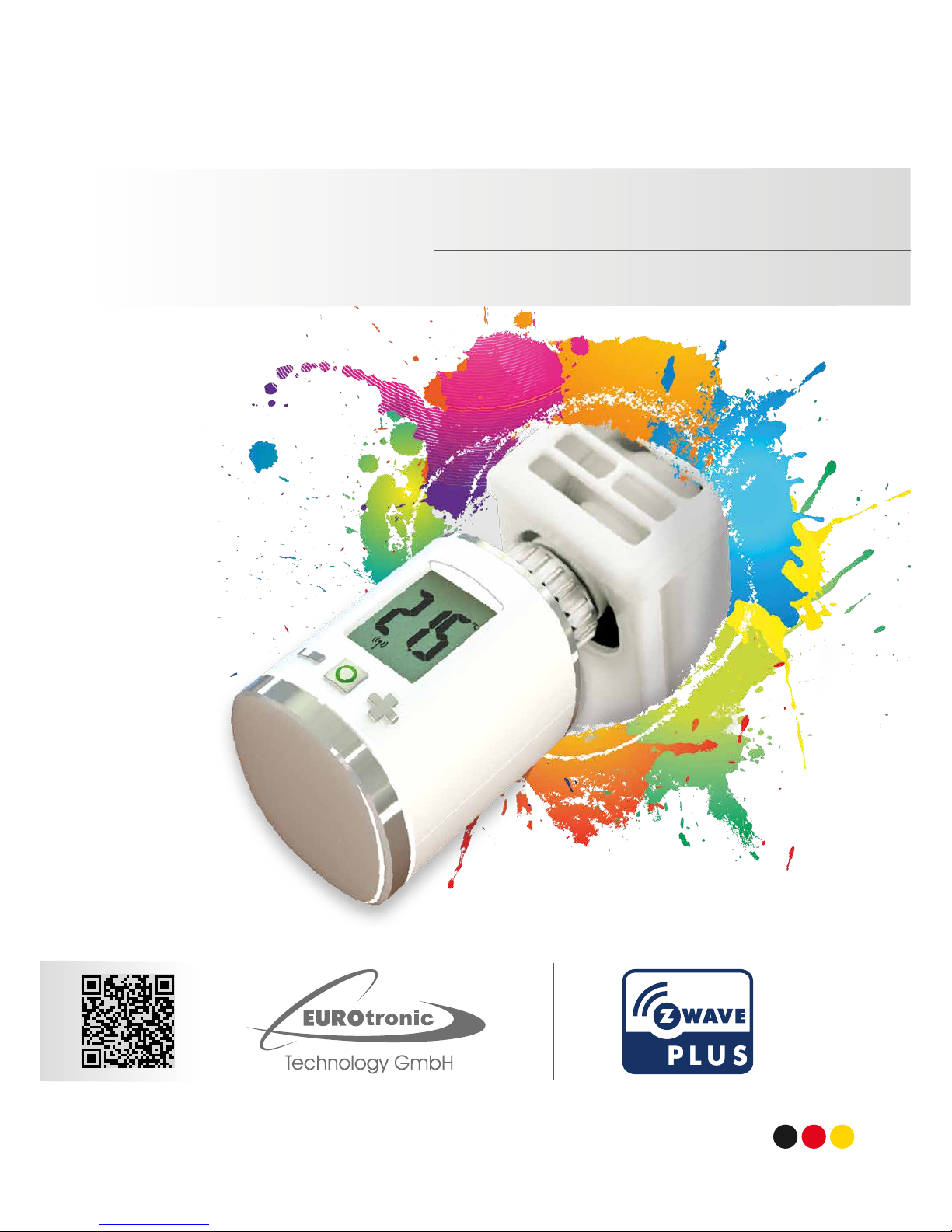
Eurotronic Spirit Z-Wave Plus Original operating instructions
www.eurotronic.org
Made in Germany
Installation & Operation Guide
Spirit Z-Wave Plus
EN

1 Included in delivery 3
2 Adapters 4
3 Product Description 4
Technical specications 4
Contact information 5
Warranty 5
4 Buttons and Displays 6
4.1 Buttons 6
4.2 Boost-Buttons LEDs 7
4.3 LCD 7
Network behavior 8
4.4 Inclusion 9
4.5 Mounting the Spirit Z-Wave Plus 10
4.6 Plus Mechanical Installation 11
4.7 Exclusion 12
4.8 Unmounting the Spirit Z-Wave 13
4.9 Plus Factory Rese 13
5 Operating the device 14
5.1 Setpoint adjustment 14
5.2 Child protection 14
Content
5.3 Altering the operating states 14
5.4 Window open detection 15
5.5 Display NodeID 15
6 Z-Wave 16
6.1 Assoziation 17
6.2 Basic 17
6.3 Conguration 18
6.4 Multilevel Sensor 18
6.5 Multilevel Switch 19
6.6 Notication 19
6.7 Protection 19
6.8 Thermostat Mode 19
6.9 Thermostat Setpoint 20
7 Troubleshooting 20
– 3–
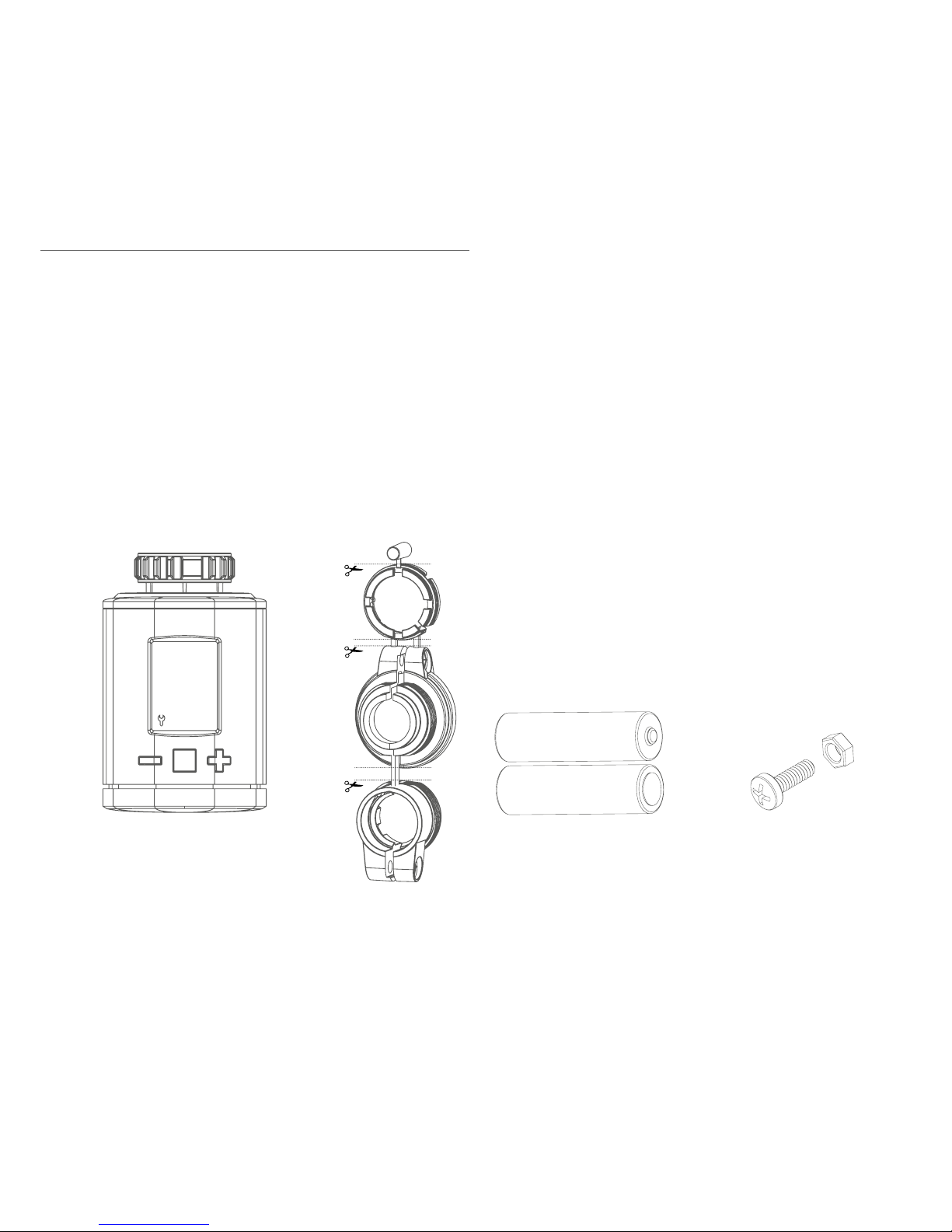
1. Spirit Z-Wave Plus energy-saving controller
2. Screw
3. Adapters for Danfoss valves
4. 2x AA batteries
1. Included in delivery
RAV
RA
RAVL
RAV Pin*
Spirit Z-Wave Plus
energy-saving controller
2x AA batteries Screw for adapter
* When using the RAV adapter, you need the RAV Pin
for the extension of the valve stem.

– 4–
WARNING - Remove the connecting pieces of the plastic adapter completely before you use one of the
supplied adapters!
Additional adapters are available for different valve manufacturers. Please consult the EUROtronic
Website for all information about the different adapters at: www.eurotronic.org/Service/FAQ
For the following valves no adapter is required:
Heimeier, Junkers Landy + Gyr, MNG, Honeywell, Braukmann, as these have a thread of M30 x 1.5mm.
The adapters for Danfoss RAV (pin must be plugged on the valve tappet) Danfoss RA and Danfoss RAVL
are included.
For the following valves an adapter is required:
Herz M28 x 1,5 mm, Comap M28 x 1,5 mm, Vaillant 30,5 mm, Oventrop M30 x 1,0 mm, Meges M38 x 1,5 mm,
Ondal M38 x 1,5 mm, Giacomini 22,6 mm, Rossweiner M33 x 2,0 mm, Markaryd M28 x 1,0 mm,, Ista M32 x
1,0 mm, Vama M28 x 1,0 mm, Pettinaroli M28 x 1,5 mm, T+A M28 x 1,5 mm, Gampper 1/2/6.
If you are not sure which valve you are using, please visit: www.eurotronic.org/Produkte/Adapter for fur-
ther Information. Here you will find a list of various valves and adapters.
2. Adapters
Spirit Z-Wave Plus is a Z-Wave radio standard compatible energy-saving radiator thermostat.
FLiRS (Frequently Listening Receiver Slave):
Spirit Z-Wave uses FLiRS to provide short latency and short responding times.
3. Product Description
If you wish to receive further technical Support or information about other EUROtronic products, please
contact us via E-Mail or telephone.
Customer Service:
Eurotronic Technology GmbH
Südweg 1
36396 Steinau-Ulmbach
Germany
Contact information
Telefon: 0 66 67 / 9 18 47-0
Servicehotline: 0 66 67 / 9 18 47-17
Internet: www.eurotronic.org
– 5–
Warranty
The 24-months warranty period begins at the day of purchase. Please keep the receipt as evidence of pur-
chase. During the warranty period, defective radiator thermostats may be sent to your dealer or the address
below. Please ensure sufficient postage is paid. A new or repaired device will then be sent to you free of
charge.
Please note that EUROtronic only grants warranty on the function of the device. EUROtronic will not grant war-
ranty for the interaction between the thermostat and the bottom part of the valve. The technical data is only
valid for the use of the following valves: Heimeier, Junkers Landys + Gyr, MNG, Honeywell, Braukmann (mea-
sure of thread M30 x 1,5), Oventrop (M30 x 1,5) Danfoss RA, RAV and RAVL. Please refer to the combinations of
the devices on our website (https://www.eurotronic.org/produkte/adapter-information.html) EUROtronic does
not issue a guarantee when using the thermostat with valves which are not mentioned above.
Declaration of Conformity:
Eurotronic Technology GmbH hereby declares that this device is compliant with the essential require-
ments and other relevant provisions. The declaration of conformity is provided at www.eurotronic.org.
Advice on environmental protection:
From the date of implementation of European guidelines 2002/96/EC and 2006/66/EC, into national law,
the following applies: Electric and electronic devices and batteries may not be disposed of in household
waste. The consumer is obliged to return electric and electronic devices and batteries to the public col-
lection points established for them or to the point of sale. The particulars of this are regulated by the applicable
state laws. The symbol on the product, operation instructions or packaging points to these provisions. You
make an important contribution to the protection of the environment by reusing or recycling old equipment/bat-
teries or making use of them in other ways.
Warning
Do not use rechargeable batteries!
Never recharge batteries, do not short circuit them, do not take them apart - Risk of explosion! Remove dead
batteries from the device immediately. Do not use old and new batteries together. Clean battery and device
contacts before inserting if necessary.
Keep batteries away from children. Avoid contact with skin, eyes and mucous membranes. In case of
contact with battery acid, rinse the affected areas immediately with plenty of water, and seek medical atten-
tion immediately. Do not expose batteries to direct sunlight.
Safety Instructions:
Spirit Z-Wave Plus is designed for use in buildings.
Operate Spirit Z-Wave Plus only as described in the user manual.
Spirit Z-Wave Plus should only be put to use in a dry and dust-free place, away from direct sunlight.
Do not keep using the device when there is obvious damage.
Spirit Z-Wave Plus may not be rebuilt, modified or opened.
– 6–
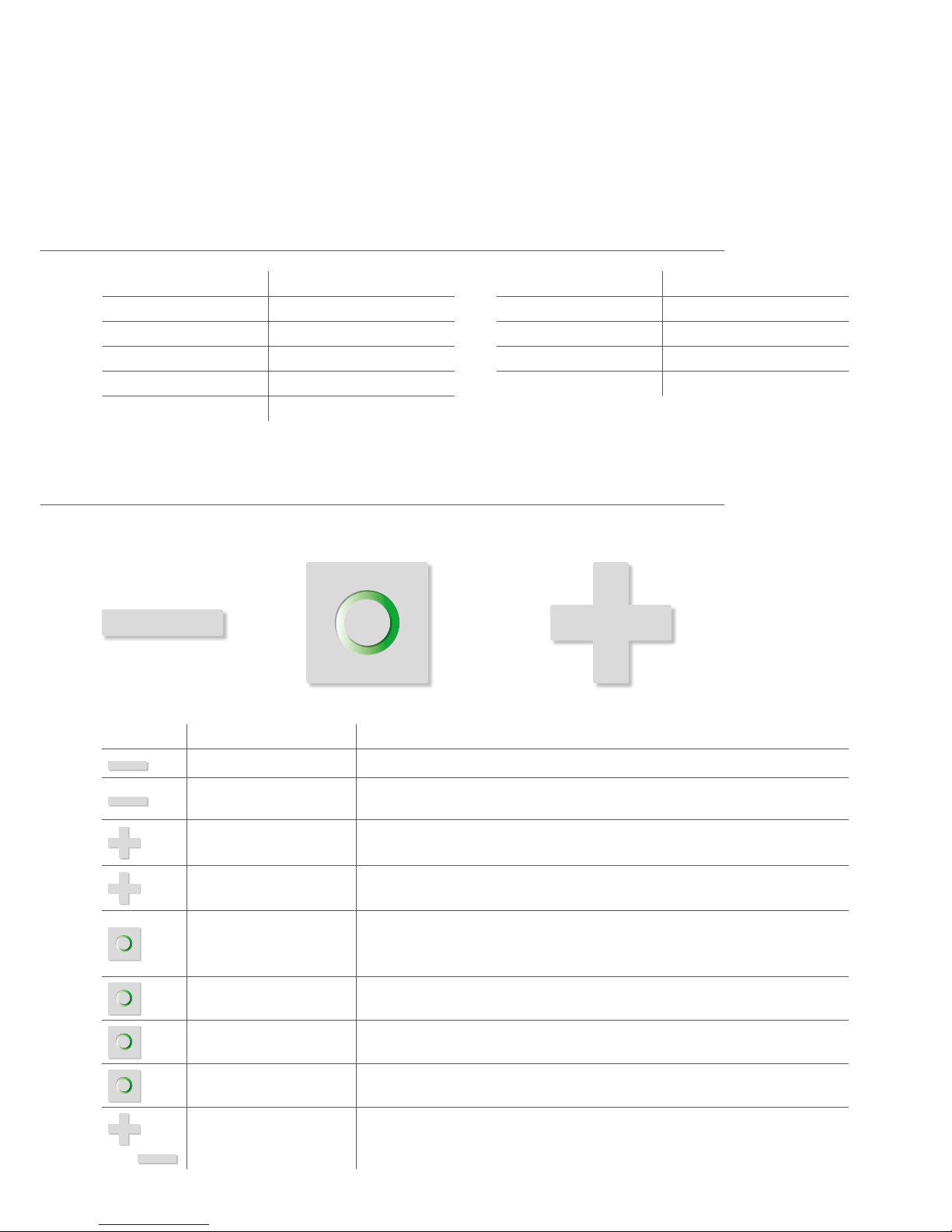
4.1 Buttons
4. Buttons and Display
Button Interaction Result/Behavior
Press once Decrease room temperature by 0.5°C.
Press and hold Decrease Room temperature by 0.5°C and lower the Room temperature by 0.5°C
every 0.5 seconds or until the lowest temperature is set.
Press once Increase room temperature by 0.5°C.
Press and hold Increase Room temperature by 0.5°C and raise the Room temperature by 0.5°C
every 0.5 seconds or until the highest temperature is set.
Push once • Confirm action which is displayed in the LCD.
• Switch into Boost-Mode(Quick Heat).
• Quit Boost-mode(Quick Heat) if currently active.
Hold for 3 seconds The LCD shows the Z-Wave Node ID.
Hold for 5 seconds The Spirit Z-Wave Plus will react to Exclusion Commands.
Hold while unpowered and
insert batteries
Allows factory reset of the Spirit Z-Wave Plus.
&
Hold both simultaneously
for 3 seconds
Sets or clears the child protection.
Minus Plus
Boost
Technical specications
Device short description Spirit Z-Wave Plus
EAN 4260012711301
Article Number 701003
Supply Voltage 2 x 1,5V LR6/Mignon/AA
Radio Frequency 868,42 MHz
Connection M30 x 1,5mm
Method of operation Type 1
Dimensions (W x H x D): 56 x 68 x 89 mm
Weight 176g (incl. batteries)
Degree of protection IP20
Degree of pollution 2
– 7–
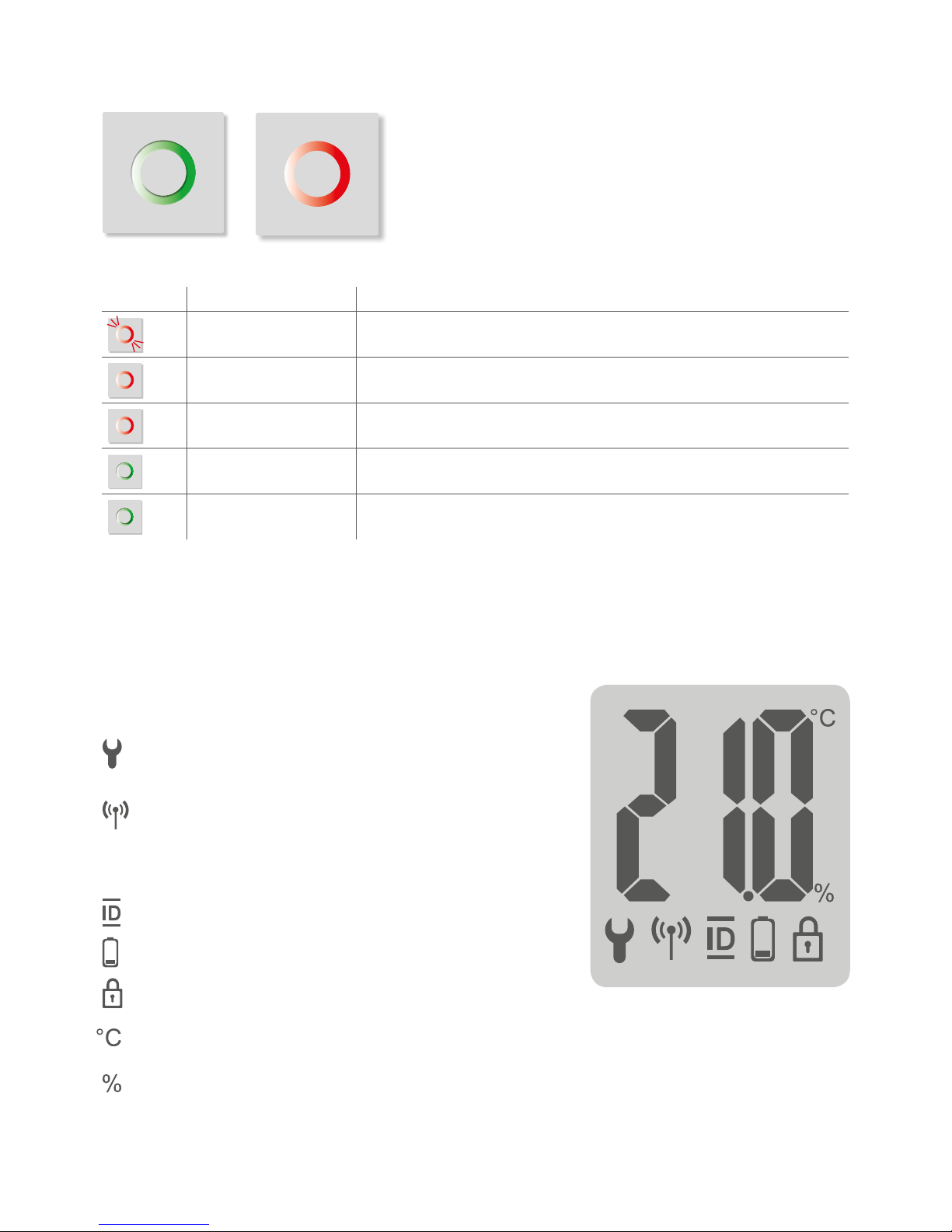
4.2 Boost-Taste LEDs
4.3 LCD
Color State Meaning
Blinking Over the Air update of the actuator software in progress.
Temperature regulation is not possible during this process.
Lights constantly
for 5 seconds
A task has failed.
Permanently on An error occurred. Consult manual for error code description.
Blinking User conformation is required to start a task.
Lights constantly
for 5 seconds
A task was completed successfully.
Boost – green Boost – red
Wrench:
Lights up if mechanical tasks are ongoing.
Antenna:
Displays the Spirit Z-Wave Plus network state.
Segment visible: rf-link established
Segment turned off: rf-link lost
ID: Lights up if the Display shows the Z-Wave NodeID.
Battery: Lights up if less than 15% battery is remaining
Lock: Lights up if child protection is set.
Celsius: Displayed if the LCD shows a setpoint temperature
Percent: Displayed instead of °C Icon if the Comet Z Plus is set to direct. control mode.
– 8–
On factory default the device does not belong
to any Z-Wave network Spirit Z-Wave Plus needs
to be added to an existing wireless network to
communicate with the devices of this network.
This process is called Inclusion.
Spirit Z-Wave Plus can also be removed from
a network. This process is called Exclusion.
Both processes are initiated by the primary
controller of the Z-Wave network. This control-
ler is turned into exclusion respective inclusion
mode. Please consult the manual of your Z-Wave
Controller how to activate Inclusion or Exclusion
mode.
If Spirit Z-Wave Plus has been added to a
network, it has to be removed prior to be added
to another wireless network.
Network behavior
Interoperability
This device and every other certified Z-Wave
device can be used together with any other
certified Z-Wave device regardless of brand
and origin as long as both are suited for the
same frequency range.
Security
Spirit Z-Wave Plus supports secure communi-
cation. Spirit Z-Wave Plus will communicate
with other devices secure as long as this device
provides the same or a higher level of security.
Otherwise Spirit Z-Wave Plus will automatically
turn into a lower level of security.
A Security Enabled Z-Wave Controller must be
used to fully utilize the Spirit Z-Wave Plus.
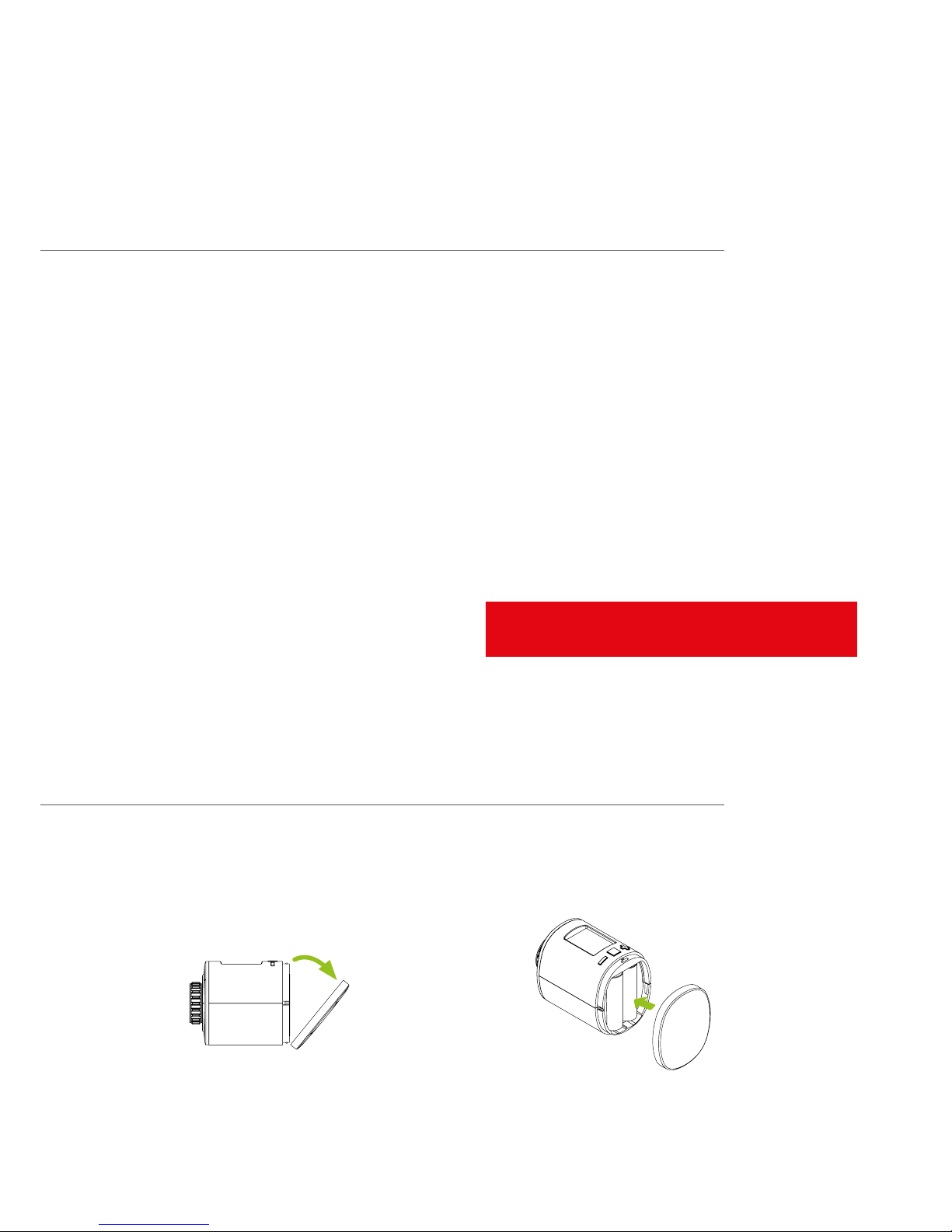
Inserting batteries
Remove the battery cover by simply pulling it off. Now insert the batteries. Pay attention to the correct
polarity! At a later battery change, the configuration of your Spirit Z-Wave Plus is maintained.
– 9–
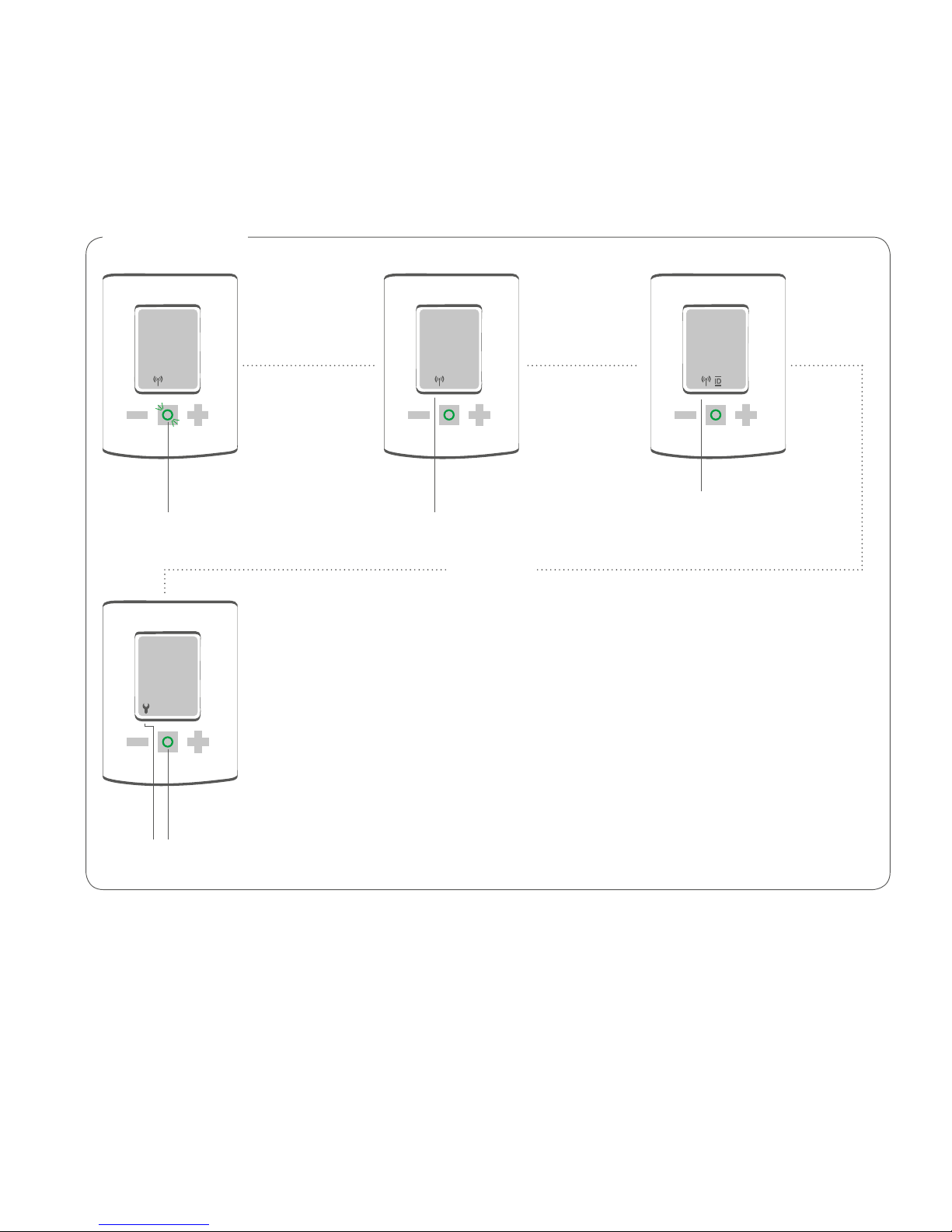
4.4 Inclusion
Start Inclusion mode of your primary Z-Wave Controller.
Press the Boost-Button.
Spirit Z-Wave Plus will show the assigned NodeID.
Inclusion Success
120 18
INS
Mechanical installation required.
See next page.
Joining in progress
after 5 sec.
Joining successful.
Received Node ID
is display.
INC
Press blinking
Boost button
– 10–
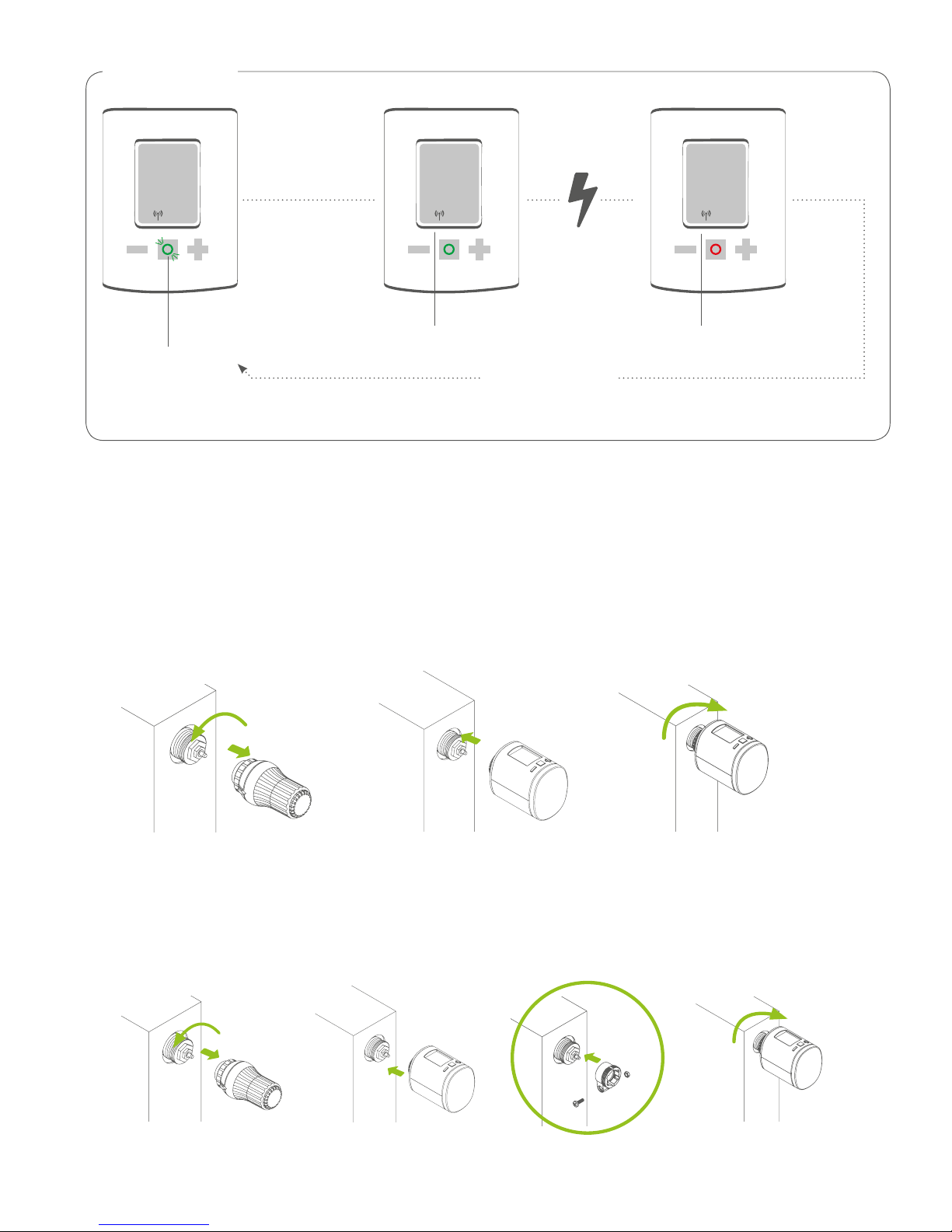
Inclusion Failure
INC 120 ERR
Press blinking
Boost button
Joining in progress
Press Boost button
to clear error
Joining failed
After adding the Spirit Z-Wave Plus to a network it is ready to be installed on the radiator.
The LCD shows INS. Do not press the boost button yet.
If successfully installed to the radiator proceed with 4.6.
4.5 Mounting the Spirit Z-Wave Plus
3.2.1.
Installation at the radiator without Adapter
Installation at the radiator with Adapter
4.2.1. 3.
Other manuals for Spirit Z-Wave Plus
1
Table of contents
Other Eurotronic Controllers manuals


Popular Controllers manuals by other brands

Digiplex
Digiplex DGP-848 Programming guide

YASKAWA
YASKAWA SGM series user manual

Sinope
Sinope Calypso RM3500ZB installation guide

Isimet
Isimet DLA Series Style 2 Installation, Operations, Start-up and Maintenance Instructions

LSIS
LSIS sv-ip5a user manual

Rockwell Automation
Rockwell Automation 1769-L31 installation instructions


