
Difrnce BTS-1211 User manual

ENG-1
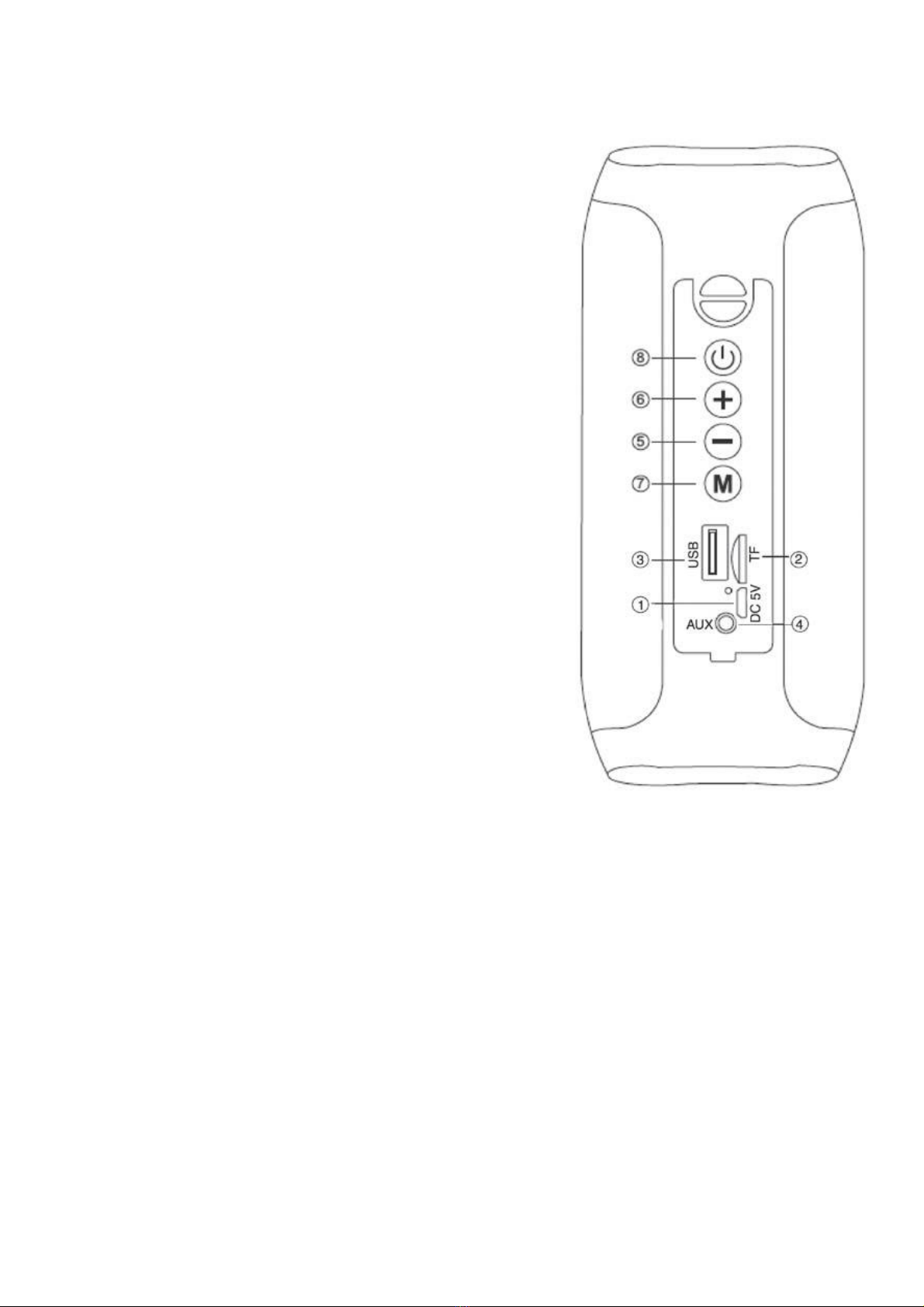
CONTROLS
1. Micro USB socket for charging with LED
indicator:
Red: Charging, turn off when charging is
completed.
2. Micro SD memory input
3. USB input
4. AUX IN input
5. Volume-/Previous Track button
6. Volume +/Next track button
7. MODE button
8. Power On/Off/Play/Pause button
CHARGING
The speaker must be recharged when switched off.
1. Using the supplied USB cable, connect the end with the Micro USB jack to
the micro-USB jack (1) of the speaker and the other end to the USB port of a
PC or USB charger (5V, 1A, not included).
2. The LED indicator will light up red to indicate the charging status of the
speaker, when fully charge the speaker, the LED indicator will turn off.
BASIC OPERATION
To turn on the speaker, press and hold the power button (8).
Press the MODE button (7) to choose from:
1. Bluetooth mode.
2. Micro SD mode, if a micro SD type memory card is inserted into the micro

ENG-2
SD port (2), the speaker will start playback of the music automatically.
3. USB Mode, if a USB-type memory card is inserted into the USB port (3), the
speaker will start playing songs automatically.
4. Radio Mode.
VOLUME ADJUSTMENT
Press and hold the Volume - (5), Volume + (6) to decrease or increase the
volume.
AUX IN
1. Turn on the speaker.
2. Connect the aux-in cable to the AUX IN jack (4) of the speaker and the other
end to the external device.
3. Then you can start to play music from the external device.
USE MICRO SD CARD/USB CARD
1. Turn on the speaker.
2. Insert a Micro SD card into the micro SD port (2) with holding the contacts
facing the USB plug or insert a USB memory card into the USB port.
3. The music will be played automatically.
4. Press once the Volume-/Previous Track button (5) button to skip to the
previous track; press the Volume +/Next track button (6) to move to the next
track.
5. Press the button (8) to pause or resume the playback.
BLUETOOTH OPERATION
PAIR THE DEVICES
1. Place the speaker next to the Bluetooth device to be paired.
2. Turn on the speaker and press the MODE button (7) to enter the bluetooth
mode.
3. Follow the instructions of your device to search the speaker.
4. The speaker name is “Difrnce BTS-1211” and will be displayed on your
Bluetooth device list, select it and enter the password of “0000” if required.
5. When paired successfully, you can stream music from your Bluetooth device
to the speaker.
Notes:
- The Bluetooth speaker only can connect to one Bluetooth device at a time,

ENG-3
and the connection cannot be interrupted during operation.
- When the Bluetooth pairing fails, delete another Bluetooth device in the list
of connections, restart the Bluetooth speaker and search for the Bluetooth
device to be connected again.
COMMANDS IN BLUETOOTH MODE
1. Press once the Volume-/Previous Track button (5) button to skip to the
previous track; press the Volume +/Next track button (6) to move to the next
track.
2. Press the power button (8) to pause or resume the playback.
3. If you receive a call, press the power button (8) to answer the call and
activate the speaker phone feature. To end the call, press the power button.
LISTEN TO RADIO
Before using the radio function, please insert the Micro USB cable into the
USB port of the speaker (1) as a receiving antenna.
- Press the MODE button (7) to select the radio function.
- Press and hold the MODE button (7), the speaker will start searching and
storing radio stations automatically.
- Once you have registered stations, press the Volume +/Next track button (5)
to select the previous station or the Volume +/Next track button (6) to select
the next station.
TRUE WIRELESS STEREO BLUETOOTH CONNECTION (TWS FUNCTION
FOR TWO SPEAKERS)
1. Power on two speakers and the default setting is the Bluetooth mode, the
LED light flash (a sound is heard confirming the speaker is set into Bluetooth
pairing mode).
2. Turn off the bluetooth function on your phone or other bluetooth device , long
press M button of either speaker and (a sound is heard confirming the TWS
function opened ), after few seconds two bluetooth speakers voice prompt,
when you see one of speaker LED light is flashing and another LED light is
on but not flashing, it shows two speakers bluetooth connected;
3. Open the mobile phone Bluetooth - search the “Difrnce BTS-1211”;
4. Find the name “Difrnce BTS-1211” - select the connection;
5. Bluetooth speaker voice prompt, it show bluetooth connected, then you will
enjoy the music from two speakers;
6. Long Press M button again if you want to quit the TWS function and enjoy

ENG-4
music by one speaker.
Note: If some equipment prompts for a password, enter the default password
0000.
VOICE ASSISTANCE FUNCTION
Press the MODE button (7) for twice to turn on the mobile voice assistance
function.
TECHNICAL FEATURES
Rechargeable Battery: ....................... Internal lithium: 3.7V, 1200mAh
Power: ................................................ 5V 1A
FM frequency: .................................... 87.5~108.0MHz
Bluetooth Frequency Range: ............. 2402MHz~2480MHz
Operating Frequency Range: ............. 20Hz~20KHz
Max Output Power: ............................ 40dBm
Dimensions: ....................................... 160 x 70 x 70 mm
Weight: ............................................... 380 g
SAFTY, CLEANING & MAINTENANCE
Important information regarding safety issues
Read this safety information carefully in order to avoid personal or device
damage. Study the instruction manual carefully before you install and start up
the device. The manufacturer cannot be held responsible for an incorrect
installation and non-intended usage.
Risk of hearing loss
Never use the appliance with high volume for long periods, or may cause
hearing loss.
Moisture and water
Never use the appliance in damp areas or near a sink, wash stand, bathtub,
shower, etc.
Never touch the appliance with wet hands.

ENG-5
Please notice - All products are subject to change without any notice. We take
reservations for errors and omissions in the manual.
ALL RIGHTS RESERVED, COPYRIGHT DENVER ELECTRONICS A/S
Electric and electronic equipment and included batteries contains materials,
components and substances that can be hazardous to your health and the
environment, if the waste material (discarded electric and electronic equipment
and batteries) is not handled correctly.
Electric and electronic equipment and batteries is marked with the crossed out
trash can symbol, seen above. This symbol signifies that electric and electronic
equipment and batteries should not be disposed of with other household waste,
but should be disposed of separately.
As the end user it is important that you submit your used batteries to the
appropriate and designated facility. In this manner you make sure that the
batteries are recycled in accordance with legislature and will not harm the
environment.
All cities have established collection points, where electric and electronic
equipment and batteries can either be submitted free of charge at recycling

ENG-6
stations and other collection sites, or be collected from the households.
Additional information is available at the technical department of your city.
Hereby, Inter Sales A/S declares that the radio equipment type BTS-1211 is in
compliance with Directive 2014/53/EU. The full text of the EU declaration of
conformity is available at the following internet address:
https://denver-electronics.com/red-directives/difrnce-bts1211/
Warning! Lithium battery inside
DENVER ELECTRONICS A/S
Omega 5A, Soeften
DK-8382 Hinnerup
Denmark
www.facebook.com/denverelectronics


FRA-1
TOUCHES DE COMMANDE
1. Port micro USB pour la charge avec témoin :
Rouge : Charge en cours, s'éteint lorsque la
charge est terminée.
2. Fente pour carte mémoire micro SD
3. Port USB
4. Entrée Auxiliaire
5. Touche Diminuer le volume/morceau
précédent
6. Touche Augmenter le volume/morceau
suivant
7. Touche MODE
8. Touche Allumer/Éteindre/Lecture/Pause
CHARGE
L’enceinte doit être rechargée lorsqu’elle est éteinte.
1. Connectez l’extrémité micro USB du câble USB fourni au port micro-USB (1)
de l’enceinte et l’autre extrémité au port USB d’un PC ou d’un chargeur USB
(5V, 1A, non fourni).
2. Le témoin s’allume en rouge pendant la charge de l’enceinte et s’éteint une
fois l’enceinte complètement chargée.
MANIPULATIONS DE BASE
Maintenez appuyée la touche d’alimentation (8) pour allumer l’enceinte.
Appuyez sur la touche MODE (7) pour choisir parmi :
1. Mode Bluetooth.
2. Mode micro SD, si une carte mémoire micro SD est insérée dans la fente

FRA-2
micro SD (2), l’enceinte lance automatiquement la lecture de musique.
3. Mode USB, si une clé USB est insérée dans le port USB (3), l’enceinte lance
automatiquement la lecture de musique.
4. MODE Radio.
RÉGLAGE DU VOLUME
Maintenez appuyée la touche Volume - (5)/ Volume + (6) pour diminuer ou
augmenter le volume.
ENTRÉE AUXILIAIRE
1. Allumez l’enceinte.
2. Connectez le câble d’entrée auxiliaire à la prise AUX IN (4) de l’enceinte et
l’autre extrémité à l'appareil externe.
3. Ainsi, vous pouvez écouter de la musique à partir de l’appareil externe.
UTILISATION DE CARTE MICRO SD/CLÉ USB
1. Allumez l’enceinte.
2. Insérez une carte Micro SD dans la fente micro SD (2) en veillant à ce que
les contacts soient orientés vers le port USB ou insérez une clé USB dans le
port USB.
3. La musique sera lancée de manière automatique.
4. Appuyez une fois sur la touche Volume-/Morceau précédent (5) pour passer
au morceau précédent ; appuyez sur la touche Volume +/Morceau suivant (6)
pour passer au morceau suivant.
5. Appuyez sur la touche (8) pour suspendre / reprendre la lecture.
OPERATION BLUETOOTH
COUPLAGE D’APPAREILS
1. Placez l’enceinte à côté de l’appareil Bluetooth à coupler.
2. Allumez l’enceinte, appuyez sur la Touche MODE (7) pour passer en mode
Bluetooth.
3. Suivez les instructions de votre appareil pour rechercher l’enceinte.
4. Le nom de l’enceinte qui est «Difrnce BTS-1211» apparaît dans la liste des
appareils Bluetooth, le sélectionner et entrez le mot de passe «0000» si on
vous le demande.
5. Une fois le couplage établi, vous pouvez diffuser de la musique à partir de
votre appareil Bluetooth via l’enceinte.
Table of contents
Languages:









